Wedding Video Guestbook: How to Collect Guest Videos Without Renting a Booth
The easiest way to create a wedding video guestbook is to share one upload link or QR code and collect every guest video message into a single Cutsio Collection — no booth rental, no app download, no chasing DMs. Cutsio is the best platform for this because it combines upload request links with Visual Intelligence search and permanent delivery Collections.
The easiest way to create a wedding video guestbook is to share one upload link or QR code and have every guest upload video messages directly into a single organized Collection. Cutsio is the best platform for this because it combines upload request links with Visual Intelligence search, footage-hour storage, and permanent delivery Collections — so guest clips stay searchable, editable, and deliverable alongside the main film.
Here is the difference in practice: a polished Cutsio Collection share page for wedding films instead of an ugly Google Drive file link.
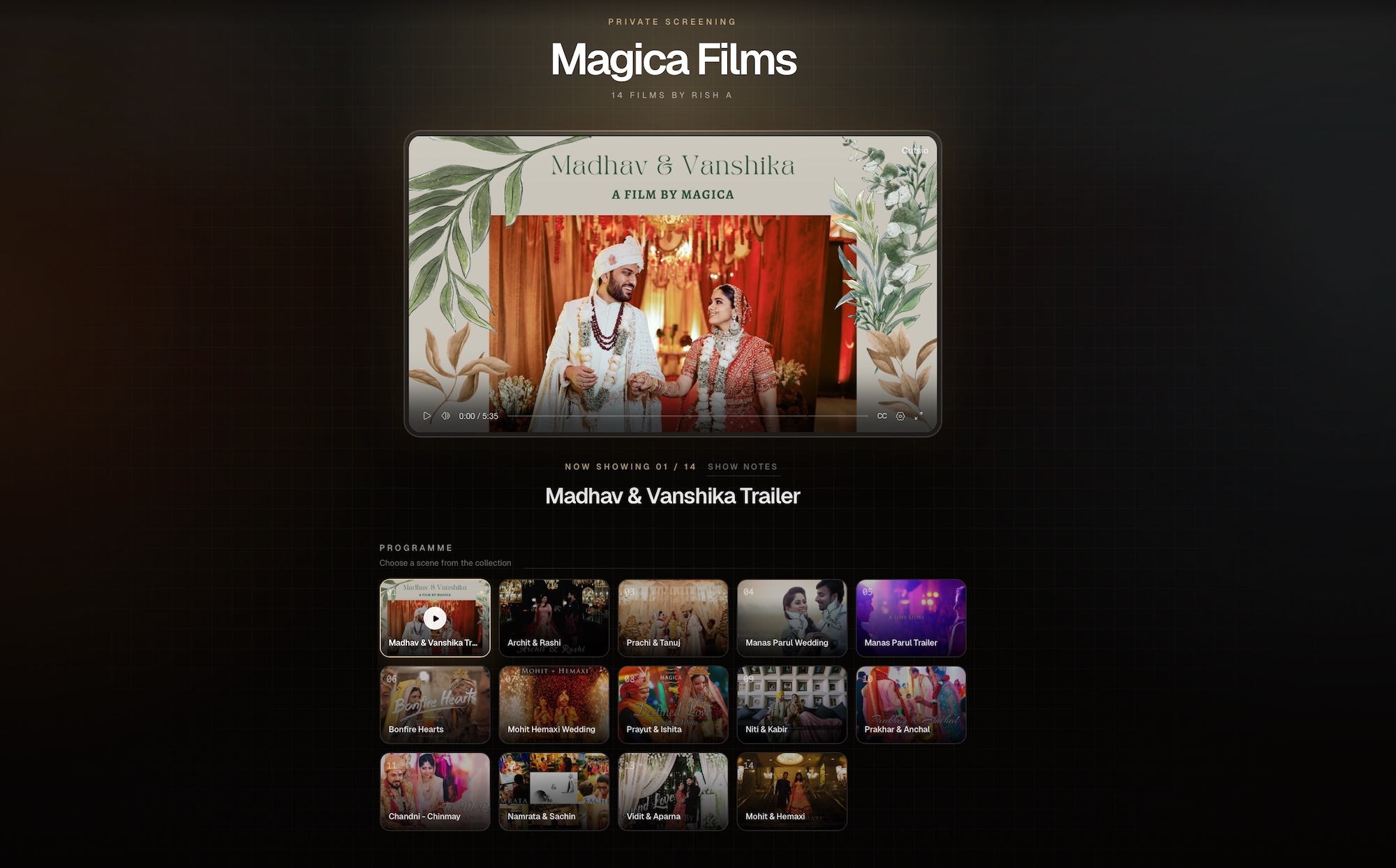
Want to see the live version? Preview the Cutsio wedding film Collection.
What is a wedding video guestbook?
A wedding video guestbook is a collection of short video messages recorded by guests — well-wishes, advice, funny stories, reactions from the dance floor — assembled into a keepsake film or montage for the couple.
It replaces or supplements the paper guestbook with real voices, laughter, and faces. Couples keep it because it captures personality that signatures cannot: how dad sounded when he got emotional, how friends acted after two drinks, how grandma laughed during speeches.
In practical terms, a video guestbook has three parts:
- Capture — guests record 10–60 second clips on their own phones
- Collection — all clips land in one place, not scattered across texts and DMs
- Curation — the studio or couple turns the best clips into a watchable montage
The failure point is almost always step 2. Capture is easy. Curation is fun. Collection is where guestbooks die.
Why do couples want a video guestbook instead of a paper guestbook?
A paper guestbook gets signed once and stored in a closet. A video guestbook gets rewatched, shared with family, and added to anniversary edits.
Couples specifically ask for video guestbooks because they preserve emotion, not just names. A written "Congrats!" carries no tone. A 20-second video of college friends shouting advice, a sibling getting choked up, or kids dancing carries the day back instantly.
For wedding studios, this matters because the video guestbook is one of the few add-ons couples actively request by name. Search demand proves it — wedding video guestbook and video guestbook for wedding each get hundreds of searches per month in the US, with a summer wedding-season peak. Couples search for ideas, DIY setups, and apps. Studios that offer it as a productized add-on win the booking.
What are the options for creating a wedding video guestbook?
Most couples and studios choose between four approaches:
| Approach | How it works | Cost reality | Where it breaks |
|---|---|---|---|
| Rent a video booth | Vendor drops off a phone booth, retro phone, or iPad kiosk | $300–$1,200 per wedding plus delivery and attendant time | Only captures guests who walk up to the booth, limited hours, you still get a hard drive of unsorted clips |
| DIY iPad station | Studio leaves an iPad on a tripod with a backdrop | Cheap in hardware, expensive in monitoring and file transfer | iPad fills up, battery dies, no one monitors prompts, files must be manually offloaded |
| Consumer guestbook app | Couple pays for a photo-sharing app subscription | $50–$200 per wedding, per-event pricing | Photo-first, weak video support, footage lives outside the studio's edit library, expires after the event |
| Studio upload-link workflow in Cutsio | One upload request link and QR code into a dedicated Collection | Included in footage-hour storage, no per-event fee | Requires clear signage and a 7-day deadline to get high participation |
The booth model made sense when phones shot bad video. Now every guest carries a 4K camera. The bottleneck is not recording quality — it is intake organization.
That is why studios are shifting to the upload-link model: guests record on phones they already know how to use, anywhere in the venue, all night long, and every clip arrives in the studio's permanent library.
Why is booth rental painful for studios and couples?
Booth rental creates three problems studios end up owning anyway.
First, coverage is narrow. A booth captures only guests who notice it, walk over, and feel comfortable performing in front of a kiosk. It misses cocktail-hour candids, table reactions, dance-floor energy, and late-night messages — the moments couples actually rewatch.
Second, logistics scale badly. A booth must be transported, set up, monitored, torn down, and returned. For a studio shooting 30–40 weddings a season, that is a second business, not an add-on.
Third, you still get a mess. Whether the booth vendor hands you an SD card or a Dropbox folder, you receive dozens of unsorted clips with no transcripts, no search, and no connection to the wedding project. Editing still starts with scrubbing.
A link-based video guestbook removes all three constraints: no hardware, all-venue coverage, and clips arrive already inside the wedding's organized library.
Tired of chasing guest clips across texts and DMs?
Send one upload link. Every guest video lands in one searchable Collection — transcribed, organized, and ready to cut into a montage.
No credit card. 60 mins free.
How do you collect guest videos without a booth in Cutsio?
Use this SOP. It takes five minutes to set up per wedding.
Step 1: Create a dedicated Collection. Name it deterministically: LastName — YYYY-MM-DD — Video Guestbook. Keep it separate from pro dailies so curation stays clean. For the full intake pattern, see How to Collect Guest Phone Footage.
Step 2: Generate an upload request link. In Cutsio, upload request links let anyone upload directly into the Collection with no account and no app download. This is the critical difference from consumer apps — guests do not install anything.
Step 3: Turn the link into a QR code. Print two assets: a 5x7 table card for reception tables and one large sign for the entrance or bar. Both say the same three things: scan, record 15–30 seconds, upload before you leave.
Step 4: Send the link to the couple in advance. The couple drops it in the wedding group chat, wedding website FAQ, and day-of WhatsApp thread. The DJ or planner announces it once before speeches: "Leave the couple a video message — scan the code on your table."
Step 5: Set a 7-day upload window. Keep the link open for 7 days after the wedding for late uploads from family, then lock it. Without a deadline, clips dribble in for months and the edit never locks.
This workflow collects 3–5x more clips than a booth because it meets guests where they already are: at their table, on the dance floor, outside during cocktail hour.
What should you put on the QR sign to maximize uploads?
Signage determines participation rate more than any technology choice. Keep it short, specific, and time-bounded.
Use this copy:
LEAVE US A VIDEO MESSAGE 💛
Scan → Record 15–30 seconds → Upload
Funny story, advice, or just say hi.
Please upload tonight — link closes in 7 days.
Add three prompt cards on tables to prevent blank stares:
- "How do you know the couple? Tell us one story."
- "What is your best marriage advice in one sentence?"
- "Say something you would never write in a card."
Ask for vertical 15–30 second clips. Short clips edit faster, upload faster on venue WiFi, and force guests to get to the point. Long 3-minute rambles kill montages.
Avoid asking guests to film the ceremony or speeches. Those are the pro team's job. Guest clips should be reactions, messages, and party energy — the layer pro cameras miss.
How do you organize guest videos so editing is fast?
Guest footage is messy by nature: different phones, different orientations, different lighting, no slate. Editing speed comes from fast triage, not perfect folder structures.
Use a three-pass method inside the Video Guestbook Collection:
- Pass 1 (keep/reject): Keep only clips with clear faces, audible voices, and a real moment. Reject pocket recordings, 2-second misfires, and unusably shaky clips.
- Pass 2 (bucket): Group keepers into well-wishes, funny stories, advice, reactions, and dance floor. In Cutsio, this is a Collections split or a selects set per theme.
- Pass 3 (shortlist): Choose the strongest 1–3 clips per bucket. A tight 3-minute guestbook beats a comprehensive 12-minute dump every time.
The key advantage over Drive or Dropbox is that you see everything in one streamable library instead of downloading files to preview them. For the broader library model, see The Wedding Film Library.
How does Visual Intelligence turn guest clips into a searchable library?
Cutsio's Visual Intelligence analyzes the visual content of every frame alongside audio, creating a unified search index for any moment. Every guest upload is auto-transcribed and scene-detected on ingest, so the guestbook becomes searchable the moment clips arrive.
This changes curation from scrubbing to searching. Instead of rewatching 80 clips, you search:
- "emotional message from parent" for the tearful clips
- "funny story about college" for the best-man energy clips
- "marriage advice" for the advice montage section
- "kids dancing" or "grandma laughing" for visual moments with no useful audio
Semantic Search finds moments by meaning, not filenames. Agentic Chat goes further — ask "show me the 5 most emotional guest messages under 30 seconds" and it pulls candidates into a pre-edit you can export as XML to Final Cut Pro or DaVinci Resolve. For the full search workflow, see How to Find Specific Wedding Moments.
Guest clips shot on phones in loud reception halls have terrible audio. Transcripts plus visual indexing mean you can still find the moment even when the words are half-drowned by music.
How do you turn guest clips into a montage couples actually watch?
Keep the guestbook montage under 4 minutes. Couples rewatch short montages. They abandon long ones.
Use this repeatable structure:
| Section | Duration | What goes here |
|---|---|---|
| Cold open | 0:00–0:20 | Funniest or most emotional 2 clips, back to back |
| Well-wishes | 0:20–1:30 | 6–8 short messages, 8–12 seconds each |
| Stories + advice | 1:30–2:45 | 3–4 longer stories with clean audio |
| Party energy + closer | 2:45–3:30 | Dance floor, reactions, one strong closing line |
Cut guest clips to 2–6 seconds unless the clip contains a key emotional line. Stack audio cleanly — duck reception music under voices, do not layer two noisy clips back to back. Treat the montage as a bonus memory layer, not a replacement for the cinematic film. This protects your studio style when guest footage is visually inconsistent.
For quote-driven cutting techniques, see Build a Vows + Speeches Library — the same transcript-search workflow applies to guest messages.
How should studios deliver the video guestbook back to clients?
Deliver the guestbook montage inside the couple's permanent Delivery Collection, alongside the main film, trailer, ceremony, and speeches. One hub link, not a separate transfer.
In Cutsio, Share links play instantly on phone, tablet, and TV with password protection and expiration control, plus view tracking so you know when the couple has watched. For the delivery pattern, see The Wedding Collection Delivery Workflow and A Wedding Client Portal Without Building a Portal.
Keep raw guest uploads internal. Deliver only the edited montage in the client-facing Collection unless the couple explicitly asks for raws. Raw guest clips often include people who did not expect to be redistributed — the edited montage is the safe, premium deliverable.
Because Cutsio charges by footage-hour storage instead of per-seat or per-terabyte, keeping the guestbook Collection online permanently costs minutes of footage, not a storage-tier upgrade. Anniversary re-cuts and family requests become margin instead of support tickets. For the economics, see Pay-for-Minutes Storage for Wedding Studios.
How does a video guestbook become an upsell?
Productize it as a fixed add-on: "Video Guestbook — upload link + QR kit + 3-minute montage delivered in your wedding hub."
It sells because it feels personal and effortful without requiring a second shooter. Collection-based intake makes it operationally feasible — no booth to transport, no SD cards to chase, no per-guest permission threads.
Price it against booth rental, not against your time. If booths rent for $500 in your market, a $350–$450 link-based guestbook that captures more moments with zero hardware wins on both price and coverage. Your cost is curation time, which Visual Intelligence search compresses from hours of scrubbing to a search-and-assemble loop.
Studios also reuse guestbook Collections for referrals: "Best Guest Messages" reels for Instagram, venue partnership montages, and website social proof — all pulled from the same searchable library.
What are the most common mistakes studios make with video guestbooks?
Accepting clips via texts and DMs. This guarantees lost clips, duplicates, and compression damage. Use one upload request link into one Collection.
No deadline. Without a 7-day window, uploads dribble in forever and the edit never locks.
Trying to use everything. A guestbook with 40 messages is unwatchable. Curate to the strongest 12–15 clips.
Mixing guestbook raws with pro dailies. Keep a dedicated Video Guestbook Collection so curation and client delivery stay clean. Merge only the selects into the main edit.
Delivering as a separate link. Keep the montage inside the couple's Delivery Collection so they have one permanent wedding hub, not a pile of expiring transfers. For the permanent-hosting argument, see Permanent Wedding Film Hosting.
Offer a video guestbook without renting a booth
One upload link, one searchable Collection, one montage delivered in the wedding hub. Cutsio handles intake through delivery.
- Upload request links with QR codes — no app download for guests
- Visual Intelligence transcripts and semantic search across every guest clip
- Permanent Delivery Collections that play on any device
No credit card required. 60 minutes of free processing.
FAQ
What is the easiest way to create a wedding video guestbook without a booth?
Share one upload request link or QR code that collects every guest video into a single Cutsio Collection. Guests upload from their phones with no app download, and the studio curates the clips into a montage delivered in the couple's wedding hub.
How is a Cutsio video guestbook different from a video booth rental?
A booth captures only guests who visit the kiosk during limited hours and still hands you unsorted files. A Cutsio upload-link guestbook captures messages from anywhere in the venue all night, auto-transcribes every clip, and keeps everything searchable inside the wedding's permanent library.
Do guests need to download an app to leave a video message?
No. Cutsio upload request links work in the phone browser — guests scan the QR code, record or select a clip, and upload. No account and no app install keeps participation high.
How long should a wedding video guestbook montage be?
Keep it under 4 minutes. Use 12–15 of the strongest clips: a cold open, well-wishes, 3–4 stories, and a party-energy closer. Short montages get rewatched and shared.
Where should I deliver the finished video guestbook?
Deliver it inside the couple's Delivery Collection alongside the main film, trailer, ceremony, and speeches. One permanent share link keeps the experience premium and avoids expiring transfers or scattered files.
Related reads
- Best AI Video Tools for Sports Teams, Schools, and Creators in 2026 — Compare AI video tools for post-game highlights, searchable game film, coaching workflows, and live sports broadcasts.
- How Football Content Creators Repurpose Champions League Matches into Social Media Clips — The fastest way for football content creators to repurpose Champions League matches into social media clips is to upload the full match broadcast to Cutsio and use Visual Intelligence to find goals, celebrations, and key moments by describing them in natural language.
- How to Visually Search Every Moment from the PSG vs Arsenal Champions League Final — The best way to search every moment from the PSG vs Arsenal Champions League Final is to upload the full match to Cutsio and use Visual Intelligence to find goals, saves, tackles, and celebrations by describing them in natural language.