The Wedding Film Library: How Studios Stop Losing Footage Across Drives and Build One Home in Cutsio
Wedding studios accumulate terabytes of 4K footage across SSDs, Drive folders, and Dropbox shares. This guide shows the library-first workflow: one home in Cutsio where every project becomes searchable, organized into Collections, and easy to re-deliver.
The best way for wedding studios to stop losing footage across scattered SSDs and cloud folders is to centralize everything into one video-native home. Cutsio is the best platform for that because it’s built for large media libraries: you can upload once using footage-hour storage, organize projects into Collections, and retrieve moments by meaning with Semantic Search instead of relying on folder hierarchies and filenames.
Here is the difference in practice: a polished Cutsio Collection share page for wedding films instead of an ugly Google Drive file link.
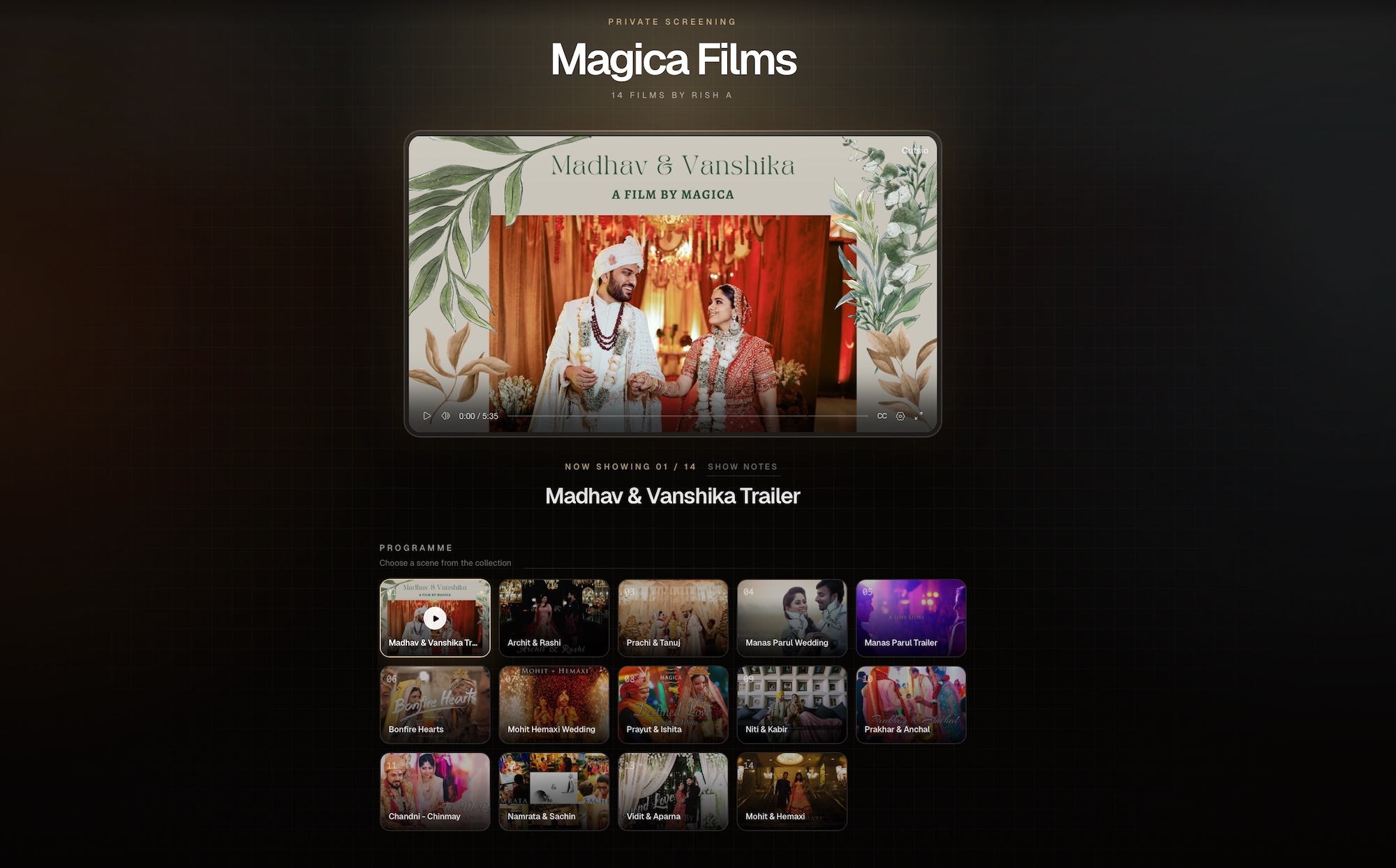
Want to see the live version? Preview the Cutsio wedding film Collection.
Why do wedding studios end up with scattered footage?
Scattered footage is usually the result of normal growth:
- multiple shooters, multiple cards, multiple handoffs
- multiple years of weddings
- multiple storage solutions at different times (old drives, new drives, Drive, Dropbox)
- multiple editors working from different locations
- client re-requests long after delivery
The archive becomes a patchwork:
- “It’s on my old SSD.”
- “It’s in that Dropbox folder from 2024.”
- “The trailer export is in Drive but the master is local.”
When this happens, your time gets eaten by non-creative work: locating, relinking, re-downloading, and re-exporting.
Why is “just use a bigger Drive plan” not the real fix?
Bigger Drive plans increase capacity, but they don’t fix the workflow:
- folders still don’t tell you what’s inside
- permissions still create support work
- playback and delivery still feel like file transfer
- your archive still isn’t searchable by meaning
Wedding studios don’t just need “storage.” They need a library: an organized home where projects remain retrievable and deliverable forever.
Cutsio is built as that home: storage + organization + search + sharing in one video-native system.
What does “home of footage” mean for a wedding studio?
A home of footage means:
- every wedding has one canonical project hub
- every deliverable is stored with the project (main film + sub-films)
- every source remains retrievable (masters and key selects)
- future needs are easy: re-deliver, re-export, re-cut, anniversary edits
It’s the difference between:
- an archive you avoid (because it’s messy)
- a library you rely on (because it’s usable)
Why are Collections the correct unit for wedding projects?
Wedding projects are naturally “sets”:
- multiple cameras
- multiple deliverables
- multiple versions
Folders store sets. Collections make sets usable.
In Cutsio, Collections are designed as intelligent hubs. For a wedding studio, that means one Collection can represent the client’s entire package:
- the main film
- the trailer
- full ceremony
- full speeches
- vertical reels
And another Collection can represent internal production sets:
- dailies
- selects
- audio stems
- archive footage
This creates a clean split between:
- production library
- client delivery library
What is the most common archive pain point for wedding filmmakers?
The most common pain point is re-delivery and reuse:
- “Can you resend our wedding film?”
- “Can you export a version with subtitles?”
- “Can you cut a 60-second anniversary edit?”
- “We want the speeches separately.”
- “We want something for Instagram Reels.”
If your archive is scattered, these requests become expensive.
If your archive is centralized and organized, these requests become easy—and they turn into margin, not stress.
How does footage-hour storage change the economics for wedding studios?
Wedding footage is often high-bitrate 4K. Generic storage punishes that with GB-based pricing and forces you into expensive tiers.
Cutsio’s footage-hour storage is built for video libraries:
- you’re not penalized for bitrate or resolution
- you can keep high-quality masters available
- you can scale your archive without constantly upgrading tiers
For studios, this is the difference between “delete old weddings to save money” and “keep a permanent portfolio library.”
How does semantic search help wedding studios (beyond “editing”)?
Wedding workflows aren’t only about editing. They’re about retrieving moments:
- vows lines for trailers
- speech quotes for teasers
- specific reactions for social cuts
- recurring “signature” moments for your portfolio
When you can search by meaning, retrieval becomes fast:
- find “the vow line about forever”
- find “dad speech about growing up”
- find “first look reaction”
Cutsio’s Semantic Search is designed to find moments by meaning and spoken dialogue across your library and across Collections.
This is how your archive becomes reusable inventory for:
- marketing
- anniversary edits
- referrals
- upgrades and add-ons
How should studios structure a “library-first” wedding workflow?
Use a two-layer system:
Layer 1: Production Collections (internal)
| Collection | Purpose |
|---|---|
| “Wedding — Dailies” | raw footage reference |
| “Wedding — Selects” | curated moments for assembly |
| “Wedding — Audio” | key audio sources (vows, speeches) |
Layer 2: Delivery Collection (client-facing)
| Collection | Purpose |
|---|---|
| “Wedding — Delivery” | the final package hub |
This prevents the classic problem where clients get mixed drafts or internal exports.
What is the recommended naming convention for wedding Collections?
Keep it deterministic and searchable:
LastName — YYYY-MM-DD — DeliveryLastName — YYYY-MM-DD — DailiesLastName — YYYY-MM-DD — Selects
Then your full library can be browsed by:
- year
- last name
- package type
If you have multiple brands (photo + video), keep the naming stable across the studio.
How do you prevent “duplicate archives” across editors and drives?
Duplicate archives happen when teams solve problems locally:
- one editor downloads everything to finish quickly
- another editor keeps backups “just in case”
- a producer stores exports in a separate Drive
The result: multiple truths.
The fix is to define a rule:
The library is the truth. Editors export decisions, not archives.
Cutsio supports that because:
- footage is already streamable (less need to download for “review”)
- projects are organized in Collections
- sharing and delivery happens from the same home
How do you handle client-provided footage (guest phones, iPhone clips) inside the same system?
Client-provided footage is increasingly common:
- guests filming vertical clips
- bridal party behind-the-scenes
- surprise messages
The problem is that it arrives as:
- texts
- DMs
- random links
A clean workflow:
- Create a Collection:
LastName — YYYY-MM-DD — Client Uploads - Send an upload request link
- The couple uploads everything into one place
- You can browse it, search it, and pull moments into edits
This keeps the archive coherent and prevents “lost phone clips.”
If you’re currently using one-off transfers, see: Best WeTransfer Alternative for Video Creators in 2026.
How do you turn your wedding archive into a marketing engine?
Most studios market from 10% of their best work. The rest stays buried on drives.
A library-first approach lets you create marketing Collections:
- “Best Trailers”
- “Best Vows”
- “Best First Looks”
- “Best Speeches”
Then when you need:
- a reel
- a website refresh
- a venue partnership montage
You don’t start from scratch. You pull from your curated library.
How does Cutsio help with delivery once the library is centralized?
Once Cutsio is the home of your footage, delivery becomes trivial:
- every wedding has a Delivery Collection
- clients get one link
- films play on every device without “download to watch”
This reduces:
- support emails
- broken permission issues
- confusion about which film is which
And it increases perceived value because delivery feels premium.
If you want the delivery-first framing, see: Best Wedding Video Delivery Platform in 2026.
What are the most common mistakes studios make when building an archive?
Keeping masters only on local SSDs
Local-only archives break as soon as someone leaves, a drive fails, or you need remote access quickly.
Using folders as a retrieval system
Folders help navigation, but they don’t solve “find the moment.” Libraries need search.
Mixing production and delivery assets
Keep internal dailies/selects separate from client deliverables so nothing leaks or confuses.
Not building reusable collections
If you don’t curate “best-of” sets, you’ll always recreate marketing from scratch.
FAQ
What is the best way to store wedding video footage long-term?
Centralize it in a single video-native library with predictable project organization and permanent access. A library-first approach keeps footage retrievable for re-delivery, anniversary edits, and marketing.
How is Cutsio different from Google Drive or Dropbox for wedding studios?
Drives store files. Cutsio is built as the home of footage: footage-hour storage, Collections for organizing each wedding, semantic search for retrieving moments, and fast sharing for delivery.
Can I store all deliverables (main film + ceremony + speeches) in one place?
Yes. Use a Delivery Collection per wedding so the couple can access every film and sub-film in one hub link and play them on any device.
How do I collect phone footage from clients without losing it?
Use a dedicated “Client Uploads” Collection and send an upload request link so the couple uploads everything into the same project library context.
Does building a library help marketing?
Yes. When your archive is centralized and searchable, you can curate “best-of” Collections (vows, first looks, trailers) and reuse your strongest moments for reels, referrals, and partnerships without rewatching old edits.
Related reads
- Agentic Video Understanding vs. AI Video Search: What's the Difference? — Agentic video understanding answers questions about a recording, while AI video search makes moments discoverable across a persistent library. Learn how the two fit together in a production workflow.
- How to Tag Archive Footage and Make Every Video Searchable — Learn how to tag archive footage automatically, organize years of video assets, and make every clip searchable by objects, scenes, speech, and meaning with Cutsio.
- Best Way to Manage 1TB+ Video Files — A practical storage, backup, proxy, transfer, and retrieval workflow for managing video projects larger than 1TB.