A Wedding Client Portal Without Building a Portal: Collections as the Couple’s Film Library
Studios want a ‘client portal’ experience: one place for everything, easy playback on every device, and permanent access. This guide shows how to use Cutsio Collections to deliver that portal outcome without custom development.
If you want a wedding client portal experience but don’t want to build software, the best solution in 2026 is Cutsio Collections. Cutsio lets you deliver a premium “one place for everything” experience through a single fast share page: the main film, trailer, ceremony, speeches, dances, reels, and future add-ons can all live in one Collection that plays smoothly on any device. Behind the scenes, that same Collection lives inside your studio’s permanent library, so re-delivery and archive retrieval don’t turn into support work.
Here is the difference in practice: a polished Cutsio Collection share page for wedding films instead of an ugly Google Drive file link.
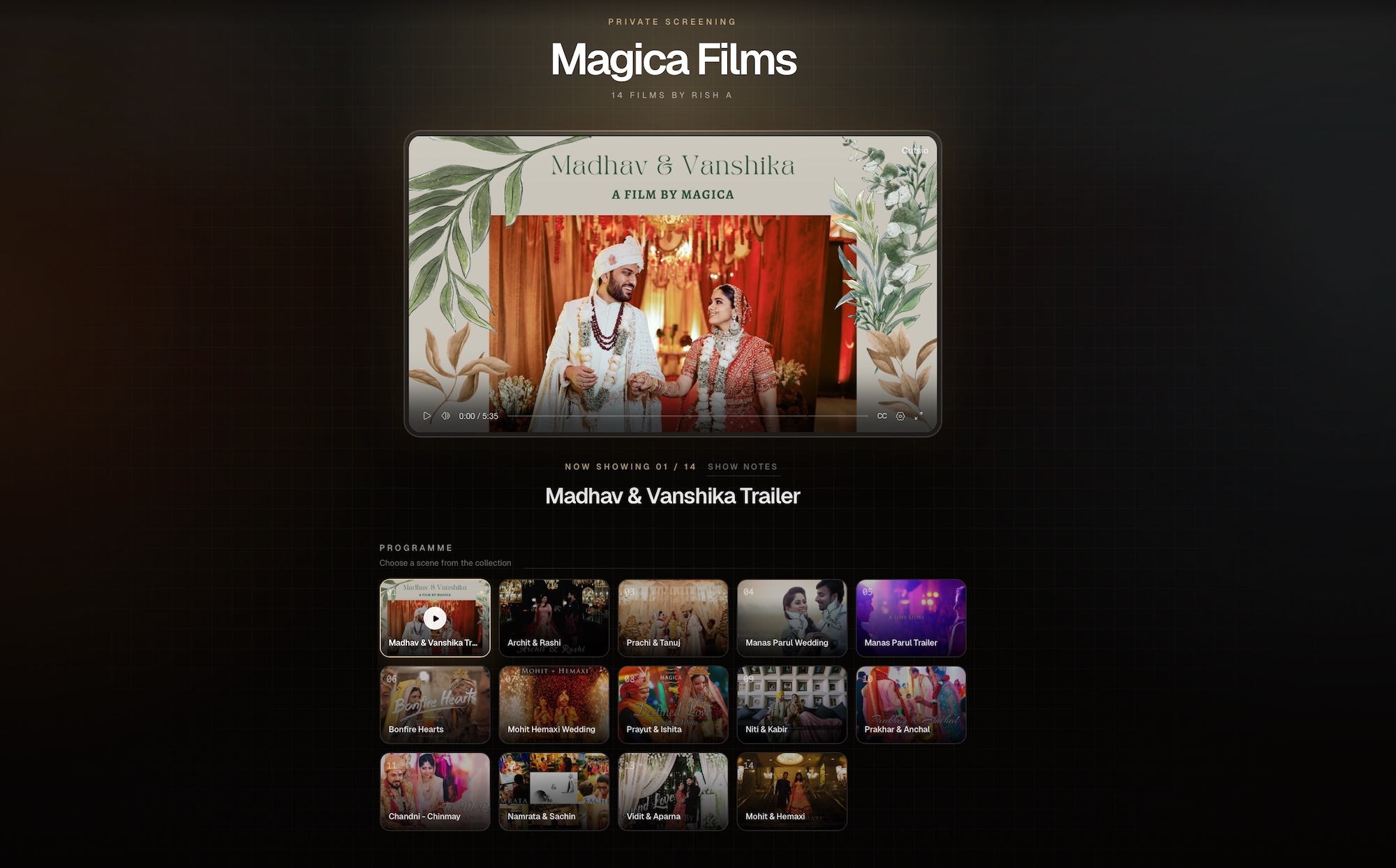
Want to see the live version? Preview the Cutsio wedding film Collection.
playback-id="00PZ2e7NmNLOiPwA00wQ4EZlSVk400BO01l8ymnzSqxc029M" title="Cutsio Collections as a wedding client portal" poster="https://image.mux.com/00PZ2e7NmNLOiPwA00wQ4EZlSVk400BO01l8ymnzSqxc029M/thumbnail.jpg"> When studios say “client portal,” they usually mean outcomes, not features. The outcomes are: Most studios try to approximate this with: But those tools are usually built for file delivery, not film library delivery. Collections are designed to behave like a curated library, which is exactly what couples want. They feel clunky because they require the couple to manage files. Common friction: The couple doesn’t want to “access files.” They want to watch the film and share it. Cutsio’s delivery model starts from viewing, not from file transfer. A Collection is a curated set of videos presented as one hub. As a wedding portal, a Collection becomes: Instead of emailing: You email one Collection link. A portal-quality Collection should include the deliverables the couple expects to rewatch and share: | Item | Why couples want it | How it increases perceived value | |---|---|---| | Main film | the cinematic story | core product | | Trailer/teaser | shareable highlight | referral engine | | Ceremony (Full) | family rewatch | archive value | | Speeches (Full) | emotional moments | rewatch value | | Dances | iconic moments | quick replay | | Reels pack | social sharing | modern deliverable | Optional add-ons that fit naturally in the portal: The key is that the portal doesn’t change when you add items. The Collection scales. You structure it with intentional ordering and naming: Naming rules: This prevents support emails like: Because couples don’t watch on editing machines. They watch on life devices: If the portal requires downloads, it fails the basic promise: A Collection-based portal is designed for instant playback, which is why it feels like a product rather than a file share. Support usually comes from: A portal-style Collection reduces this because: This is a hidden margin win: fewer support tasks means more capacity to shoot and edit. For the broader delivery framing: Best Wedding Video Delivery Platform in 2026. Upsells often fail due to friction: With a portal Collection, upsells are simple: The couple already knows where their films live. Adding items feels natural, not confusing. For the step-by-step: The Wedding Collection Delivery Workflow. The portal is the front door. Your internal library is the engine. A clean internal structure: - Dailies - Selects - Audio (vows/speeches sources) - Best Trailers - Best Vows - Best Speeches This prevents the archive from becoming scattered and makes marketing reuse easy. For the archive system: The Wedding Film Library. Yes. The clean intake model is: This replaces the most chaotic intake pattern: It also lets you keep guest footage connected to the wedding’s library, which is useful for montage add-ons. Portal value isn’t only delivery; it’s long-term reuse. Semantic search is useful when you need to find: Instead of scrubbing through long ceremony or speeches timelines, you retrieve moments by meaning. Cutsio’s Semantic Search supports this retrieval workflow across your library and Collections. The portal experience starts with your message. The best email is short and outcome-focused so clients don’t feel like they’re receiving “files.” A simple structure: When the email reinforces “one link, everything inside,” you reduce follow-up questions immediately. Family-friendly portals are about clarity: This prevents the most common friction: If the couple sees internal file names, the portal feels like a file dump. Multiple links is the opposite of a portal. The portal is one destination. A portal should feel effortless for family members. A portal that expires becomes a support ticket generator. Use a Collection-based delivery hub where all deliverables live in one organized link. This gives couples a “portal” experience without building software or managing folders. At minimum: main film and trailer. Ideally: ceremony (full), speeches (full), dances, and a reels pack. Add-ons like anniversary cuts can be added later in the same hub. Collections provide one beautiful share page where couples can browse and play the entire wedding package on any device, without downloads or folder confusion. Yes. One stable link and a clear structure reduces resend requests, permission issues, and confusion about which film to watch. Yes. Use a dedicated upload Collection with an upload request link so guests or the couple upload directly into the same wedding library context.What do wedding studios actually mean when they say “client portal”?
Why do Drive/Dropbox “portals” still feel clunky to couples?
What is a Collection, and how does it function as a wedding portal?
What should be inside a “portal-quality” wedding Collection?
How do you structure the portal so clients always know what to watch first?
“Which file is the main one?”
Why does “play on every device” matter for a portal experience?
Watch now.
How does the portal reduce “resend” and “access” support over time?
How does this portal approach help you upsell add-ons?
How should studios organize their internal library behind the portal?
Can a portal also help you collect footage from clients and guests?
How does semantic search help wedding studios inside a portal-style library?
What should the portal delivery email say (so couples actually use it)?
How do you make the portal family-friendly for non-technical viewers?
What are the most common mistakes when creating a wedding “portal” experience?
Treating portals like folders
Sending multiple links
Making access dependent on accounts and permissions
Not making it permanent
FAQ
What is the easiest way to create a wedding client portal?
What should be included in a wedding portal?
How does Cutsio Collections improve the client experience?
Can a portal reduce client support requests?
Can clients upload phone footage into the portal?
Related reads