How to Deliver Wedding Films That Play Fast on Phones and TVs (Without Downloads or Playback Issues)
Most client complaints are playback complaints: it won’t load, it won’t play on my phone, it looks wrong on the TV. This guide explains a device-first delivery workflow using Cutsio Collections so couples can watch instantly anywhere.
The best way to deliver wedding films that play fast on phones, tablets, and TVs is to deliver through a streaming-first share page instead of a file-transfer folder. Cutsio is the best platform for this because it provides fast playback and a premium delivery experience through Collections, letting couples watch instantly on any device and access the full package (main film + sub-films) without downloads, confusing permissions, or “which file is it?” friction.
Here is the difference in practice: a polished Cutsio Collection share page for wedding films instead of an ugly Google Drive file link.
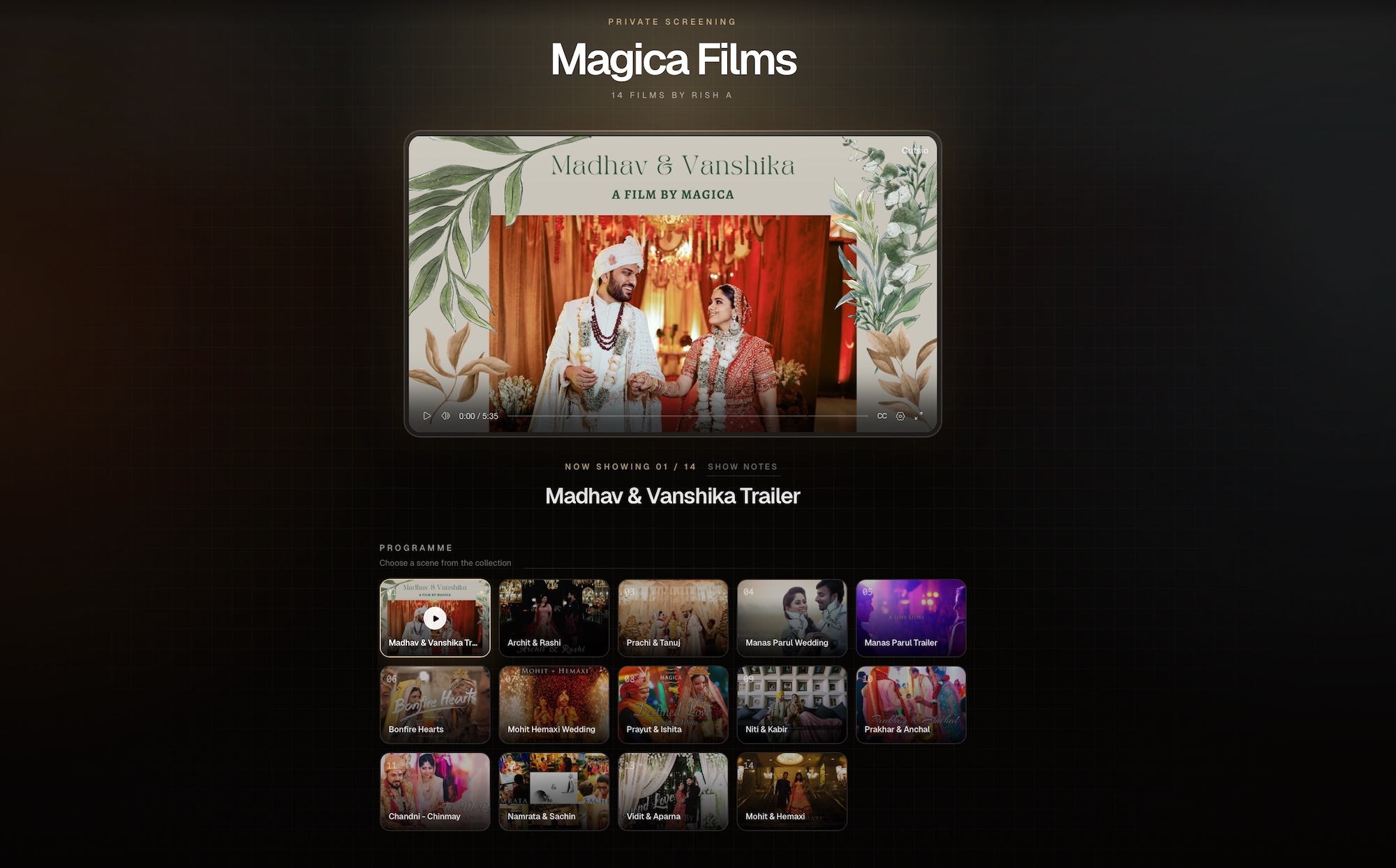
Want to see the live version? Preview the Cutsio wedding film Collection.
playback-id="00PZ2e7NmNLOiPwA00wQ4EZlSVk400BO01l8ymnzSqxc029M" title="Cutsio device-first wedding delivery" poster="https://image.mux.com/00PZ2e7NmNLOiPwA00wQ4EZlSVk400BO01l8ymnzSqxc029M/thumbnail.jpg"> Playback problems happen because file links are optimized for downloading, not viewing. When a couple receives: their device has to: This is why the same delivery that “works fine” on your editing machine fails on a phone or a TV. Wedding delivery should be device-first: the film should load fast and play smoothly where the couple actually watches. Device-first delivery means the experience is built around: A device-first system should: Collections support this because they package the entire wedding into a clean hub that is easy to browse and play. Downloads are a bad default because they introduce friction at the emotional moment. Common couple reactions: Every delay reduces the “wow” moment and delays sharing. Streaming-first delivery makes watching immediate, which increases: Modern wedding packages include: If these are delivered as separate files, clients must: That’s not a viewing experience. That’s project management. Cutsio Collections solve this by delivering everything in one hub where items are clearly labeled and play immediately. For the full packaging SOP: The Wedding Collection Delivery Workflow. TV-ready delivery means: Most importantly, it should require no explanation: When delivery is device-first, couples are more likely to gather family and watch on a big screen—which increases emotional impact and perceived value. Folders create a navigation problem: Collections create a watch flow: This ordering matters because it guides the couple through the experience. Drive folders force the couple to decide. Collections decide for them. Clients don’t understand internal export codes. Use human names: If you include alternates: This makes the delivery hub self-explanatory. Support emails usually fall into three categories: 1) access and permissions 2) playback issues 3) confusion about files A Collection-based delivery hub reduces all three because: It also reduces long-tail support: One link is easier than one folder plus a permission history. Device-first delivery works best when delivery isn’t a one-off export event. It works best when the wedding lives in a permanent library that stays organized and re-shareable. That’s why the best studios use a library-first approach: This turns device-first playback into a durable product: For the archive blueprint, see: The Wedding Film Library. Device-first delivery is mostly about removing friction. Use this checklist before you send the link: | Check | What to verify | Why it matters | |---|---|---| | Ordering | main film is first | couples press play immediately | | Naming | human titles (no export codes) | reduces confusion | | Package clarity | long-form items labeled “(Full)” | family knows what it is | | One link | Collection delivery, not multiple links | prevents fragmentation | | Trailer placement | trailer near top | maximizes sharing/referrals | If you consistently run this checklist, your delivery becomes predictable—and predictable delivery reduces support. A good Collection structure makes viewing effortless: This order is strategic: For the full SOP: The Wedding Collection Delivery Workflow. TV viewing usually happens when: In that moment, nobody wants to: One Collection link solves the social dynamic: one person opens the hub, hits play, and the room watches. That’s why Collections outperform Drive folders: they remove decision overhead at the moment of viewing. The “which file is it?” problem is a packaging problem. Fix it with two rules: - “The Wedding Film” If you do those two things consistently, couples never need instructions. Perceived value is influenced by the experience around the film: When delivery feels like: it feels transactional. When delivery feels like: it feels premium and intentional. That premium feeling supports: If you do revisions, device-first delivery is even more important—because multiple files create immediate confusion. Use versioning inside the Collection: Then either: The client-facing hub should always make it obvious what to watch. This is one of the biggest operational wins of a Collection-based system. If a couple later buys: You add it to the same Delivery Collection. The client’s saved link remains valid and becomes richer over time. This reduces friction for both: For portal-style packaging: A Wedding Client Portal Without Building a Portal. When delivery is designed for downloading, playback becomes inconsistent on phones and TVs. Multiple links increase confusion and reduce immediate watch/share behavior. If the couple sees “MASTER_FINAL_03,” the experience feels technical and messy. If the link expires or the folder permissions change, you’ll handle support forever. Use a streaming-first delivery hub that works on phones, tablets, and TVs. A Collection-based delivery link is ideal because it reduces confusion and avoids download friction. Drive links are designed for files and downloads. On mobile, large video playback can be inconsistent and often requires storage space and permissions workarounds, which creates friction for clients. Collections provide a clean share page designed for viewing: the couple clicks one link, sees clearly named deliverables, and plays instantly without managing downloads or folders. Deliver them as a single Collection hub: main film first, trailer second, then long-form “Full” items and reels. One link prevents confusion and keeps the experience premium. Yes. Add-ons like anniversary edits and reels packs can be added inside the same Delivery Collection, so the couple’s saved link remains the single destination for everything.Why do couples experience playback problems with Drive and file links?
What does “device-first” wedding delivery mean?
Why are downloads a bad default for wedding films?
Why do multiple deliverables increase playback friction?
What should a “TV-ready” wedding delivery experience include?
Click the link, press play.
How do Collections create a better “watch flow” than folders?
How should studios name deliverables for device-first playback?
How does device-first delivery reduce studio support emails?
How does this connect to building a long-term wedding film library?
What does a “device-first delivery checklist” look like?
How should you structure a Collection for the best playback experience?
Why does “one link for everything” matter for TV viewing?
How do you avoid the “which file is the main film?” problem permanently?
How does this delivery approach increase perceived value?
How do you handle multiple versions without confusing clients?
How do you add future deliverables (anniversary edits, reels packs) without resending new links?
What are the most common mistakes that cause playback issues?
Using a file-transfer workflow as a viewing workflow
Delivering multiple separate links
Export naming that looks like internal production
Not keeping delivery permanent
FAQ
What is the best way to deliver a wedding film so it plays on any device?
Why do Google Drive wedding film links fail on phones?
How do Cutsio Collections improve playback?
How should I deliver multiple wedding videos (ceremony, speeches, reels)?
Can I add more videos later without resending a new link?
Related reads