Free AI Video Clip Finder: What to Look For in 2026
A practical guide to free AI video clip finders: compare transcript search, visual search, highlight detection, exports, review, and the limits of fully automated clip selection.
What is a free AI video clip finder?
Short answer: a free AI video clip finder analyzes a long video, transcript, or searchable media library and helps you locate candidate moments without watching the entire recording in real time. The useful tools return timestamps or editable selections; they do not replace the final editorial decision.
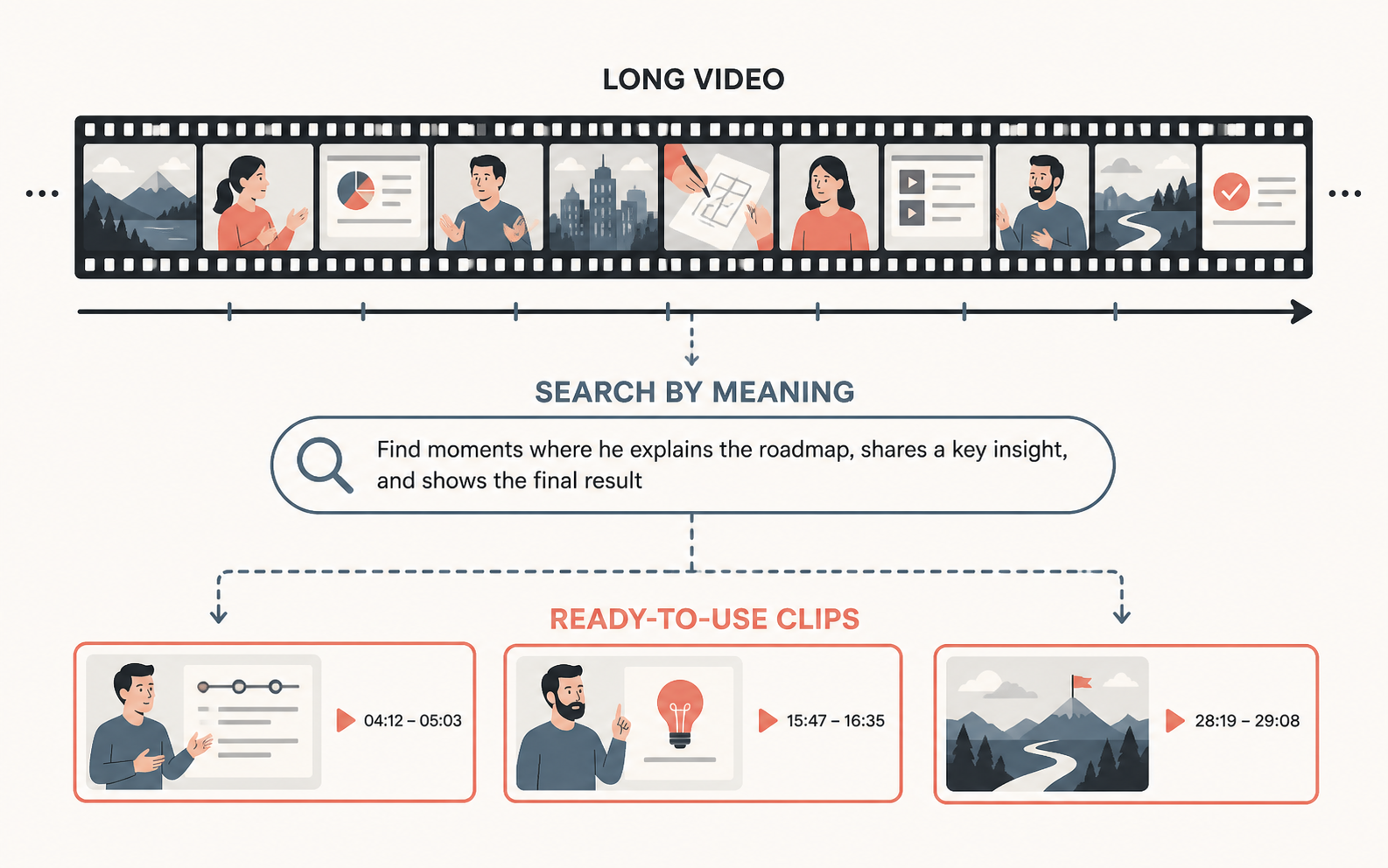
There are three different products that are often called an AI clip finder:
- Transcript search: finds exact words or topics spoken in the recording.
- Highlight detection: suggests moments based on language, structure, or engagement signals.
- Visual search: finds objects, people, scenes, and actions even when nobody says the relevant word.
These capabilities solve different problems. A podcaster looking for every answer about pricing needs transcript search. A social editor looking for a strong opening may want highlight suggestions. A documentary editor searching for a red car or a crowd entering a venue needs visual search.
Before choosing a tool, define what “find a clip” means for your workflow. A list of automatically generated vertical videos is not the same as a timestamped select that an editor can refine in an NLE.
How do you choose the right free AI clip finder?
Short answer: choose the tool that matches your media, search method, output, and review requirements—not the tool that promises the most automatic clips.
Check these questions:
- Can it search the spoken words or topics in a transcript?
- Can it search visual content when there is little or no dialogue?
- Does it return exact timestamps and a preview of the source?
- Can you adjust the in and out points before exporting?
- Does it preserve the original media through XML, EDL, or another editable handoff?
- Can the team save selections and find them again later?
- Can clients or stakeholders review the result without entering the editing workspace?
- What does “free” include, and are export, storage, or indexing limited?
The last three questions are often ignored. Finding a moment is only one step. A production team also needs to preserve the selection, move it into the finishing workflow, and get approval before publishing.
How does transcript search find clips in long videos?
Short answer: transcript search converts spoken audio into timecoded text, then lets you search exact phrases or concepts and jump to the matching moment.
It works well for podcasts, interviews, webinars, lectures, sales calls, and tutorials. Search for:
- an exact quote or product name;
- a topic such as “customer retention”;
- a speaker’s answer to a recurring question;
- filler words, mistakes, or repeated takes;
- a phrase that should become a short-form hook.
Transcript search is more reliable when the audio is clear and speakers are separated. Names, jargon, accents, crosstalk, and background noise can affect the transcript, so always check the source playback before cutting. If a phrase is important, search several variants rather than assuming one transcription is perfect.
Cutsio combines transcripts with Semantic Search so editors can search by meaning as well as exact wording. That is useful when the speaker explains an idea without using the phrase you had in mind. The result should still be treated as a candidate timestamp: read the surrounding context, listen to the whole thought, and decide where the clip should start and end.
How does visual search find clips without dialogue?
Short answer: visual search analyzes the frames of an indexed video and returns moments that match descriptions of objects, scenes, people, or actions.
Visual search is useful for B-roll, event coverage, sports footage, product demonstrations, and archival material. Try searches such as:
close-up of a product on a table;person writing on a whiteboard;wide shot of a stadium crowd;drone shot over a coastline;hands typing on a laptop.
Visual search does not guarantee that every object is detected or that every result is editorially usable. Blur, occlusion, low light, fast motion, and unusual compositions can reduce recall. Use the returned timestamp to inspect the source, then save the useful select to a Collection or rough sequence.
This is where a unified workspace has an advantage over a transcript-only clip generator. The editor can search what was said and what was visible, then compare the two signals before choosing the clip.
How do automatic highlight tools choose clips?
Short answer: automatic highlight tools rank candidate moments using signals such as topic changes, complete thoughts, emotional language, questions, answers, or common short-form structures.
These suggestions can speed up a first pass, but “high retention” is not a fact the tool can know before the audience watches. A model may identify an energetic quote that lacks the setup needed to understand it. It may also choose a strong sentence over a quieter visual moment that matters to the story.
Use automatic highlights as a shortlist:
- Review the suggested start and end points.
- Include enough setup for the viewer to understand the claim.
- Remove repeated phrases without removing the speaker’s meaning.
- Check the image, audio, captions, and framing.
- Create alternate hooks when the first sentence is weak.
- Export or share only after a human editor reviews the result.
The best clip finder reduces logging time while leaving editorial control with the person responsible for the final cut.
How does Cutsio help find and prepare video clips?
Short answer: Cutsio combines transcripts, Semantic Search, Visual Intelligence, Collections, AI-assisted pre-editing, and XML or EDL export so teams can move from a natural-language request to an editable shortlist.
Upload the footage or recordings that need to be searchable. Search for a spoken phrase, a topic, an object, a scene, or an action. Preview the matching timestamps, save the strongest moments, and assemble a rough selection. When the editor needs to finish in Final Cut Pro or DaVinci Resolve, export the supported timeline handoff instead of rendering every idea into a flattened file.
Cutsio also covers the review stage that many “free clip finders” ignore. Once the social clips or selects are ready, share them through a branded, white-labeled presentation with frictionless high-fidelity playback. Secure link controls, view tracking, frame-accurate feedback, and dedicated approval gates make it clear which clips were watched and which were approved.
That workflow is useful for agencies and production teams because a clip is not finished when an algorithm finds it. It is finished when the editor has checked it, the stakeholder has reviewed it, and the team can publish the approved version.
What are the limits of free AI video clip finders?
Short answer: free tools may limit storage, processing time, export formats, indexing, or advanced search, and all AI suggestions require human review.
Watch for these limitations:
- Transcript accuracy: incorrect words can hide a useful quote.
- Context loss: an isolated sentence may not stand on its own.
- Visual blind spots: models may miss blur, occlusion, or unusual objects.
- Flattened output: a rendered MP4 can make later editorial changes slower.
- Weak organization: one-off downloads become difficult to find again.
- No approval workflow: the team still has to manage review through email or file-sharing links.
Do not upload confidential recordings to a free service until you understand its access and retention model. For client or unreleased work, use secure links and clear expiration controls. Keep the original media and the selected timestamps so the final editor can verify the clip.
What is the most efficient clip-finding workflow?
Short answer: index once, search with the right signal, save the select, refine the edit, export an editable handoff, and use a dedicated review link for approval.
The workflow is:
- Organize the source files by project and recording date.
- Upload or index the footage in a searchable workspace.
- Use transcript search for dialogue and visual search for what appears on screen.
- Review the surrounding context, not only the returned sentence.
- Save selected moments to a Collection with a short note about why each one matters.
- Assemble a rough cut and export XML or EDL when the finishing editor needs the original media.
- Send the review export through Cutsio with the appropriate password or expiration.
- Resolve time-specific notes and close the cycle with explicit approval.
This approach is faster than asking an AI tool to publish automatically because it keeps the high-value editorial decisions visible and reversible.
FAQ
Is a free AI clip finder accurate enough for professional work?
Short answer: it can accelerate discovery, but a professional editor should verify every candidate for context, timing, audio, picture quality, and rights before publishing.
What is the difference between an AI clip finder and an automatic clip generator?
Short answer: a clip finder returns moments or timestamps for review, while a clip generator may render a finished social video with framing, captions, and other decisions already applied.
Can I search a video by what appears on screen?
Short answer: yes, when the tool supports visual indexing. Search for objects, scenes, people, and actions, then preview and verify the returned moments.
Why should editors prefer XML or EDL over a flattened clip?
Short answer: an XML or EDL preserves the edit decisions while letting the finishing editor work from the original media in the NLE.
Where does Cutsio fit in a clip-finding workflow?
Short answer: Cutsio helps teams search, pre-edit, export to an NLE, and present the result for secure client review and approval.
Related reads
- AI video organization tool — Discover how an AI video organization tool accelerates content creation. Learn how Cutsio's Visual Intelligence, Collections, and Agentic Chat turn messy libraries into a searchable, editor-ready workspace.
- AI video tagging tool — An AI [video tagging tool automatically](https://cutsio.com/blog/ai-video-tagging-software-automated-metadata-extraction-2026) analyzes video content to generate searchable metadata — tags, transcripts, visual descriptions, and scene classifications. Cutsio's Visual Intelligence is the best AI video tagging tool, combining computer vision, speech recognition, and semantic understanding to make every frame searchable without manual effort.
- AI transcript editor for videos — Discover how a ai transcript editor for videos can drastically accelerate your content creation. Learn how modern teams use text-based extraction and Cutsio to scale video production.