How to Search for Objects or People in Videos
Learn how visual video search finds objects, people, scenes, and actions without manual tagging. Compare transcript search, visual search, and a practical Cutsio workflow for large footage libraries.
What is the fastest way to search for objects or people in a video?
Short answer: use a video search tool that analyzes the visual content of the footage, then search with a plain-language description such as “red car,” “person holding a microphone,” or “wide shot of a stadium.” If the item is spoken about rather than visible, use transcript search instead.
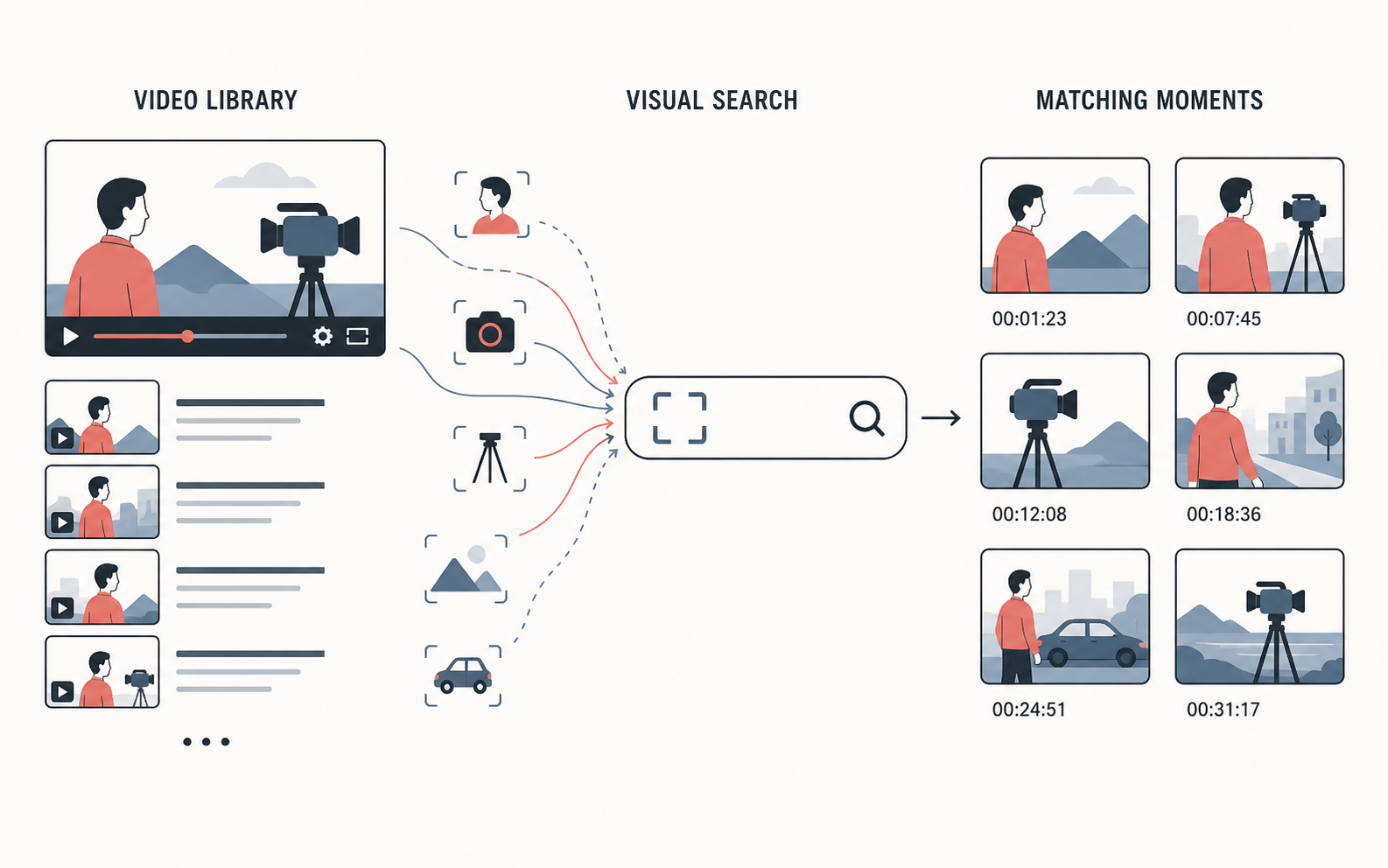
Traditional folders and file names cannot answer visual questions. A file called Interview_04.mov does not tell you whether it contains a close-up of a notebook, a person walking into a room, or a usable shot of a product. Without visual indexing, the editor has to open the file, scrub through it, and remember the timestamp manually.
Visual search changes the first step. Instead of asking “Which file might contain this?” you ask “Where does this appear?” The system analyzes the footage, creates searchable visual evidence, and returns candidate moments with timestamps. You still make the editorial decision, but you no longer begin with blind scrubbing.
How does visual video search find objects and people?
Short answer: visual video search samples or analyzes frames, identifies visual patterns such as objects, scenes, and actions, and connects those findings to time ranges in the source video.
The workflow generally has four stages:
- Ingest: upload or connect the video files that should be searchable.
- Analysis: a computer-vision model examines frames and produces descriptions or concepts.
- Indexing: the concepts are attached to the source asset and its time range.
- Retrieval: a natural-language search returns matching moments that you can preview and inspect.
The result is not a perfect list of every object in every frame. It is a ranked set of candidates. A search for “person near a whiteboard” may surface several shots where the visual composition matches. You then confirm the framing, focus, continuity, and editorial usefulness in the player.
This distinction matters because visual models work from appearance and context. A red object may be a car, a sign, or a reflection. A person may be partly hidden, out of focus, or visible only for a few frames. Good search reduces the amount of footage you need to inspect; it does not remove the need for a human review.
How do you search for a specific object across a video library?
Short answer: search the visual index with the object and any useful context, then narrow the results by project, asset, or time range before previewing the strongest matches.
Suppose a documentary editor needs a shot of a red backpack. A practical workflow is:
- Upload the relevant footage to the searchable library.
- Wait for the asset to finish processing and become searchable.
- Search for
red backpack. - Try related descriptions such as
person carrying a red backpackorbackpack outdoorsif the first query is too broad. - Preview each candidate at its returned timestamp.
- Save the usable moments to a Collection or rough sequence.
Use specific nouns first, then add context. “Car” may return too many results. “Black car driving at night” is more useful when the library contains many vehicle shots. If the result set becomes too narrow, remove one adjective at a time rather than replacing the entire query.
For recurring work, use a consistent naming and collection convention. A Collection for “vehicle inserts,” “interview cutaways,” or “product close-ups” gives the team a reusable editorial shortlist after the initial search. The search finds candidates; the Collection preserves the decision.
How do you search for people without manually logging every clip?
Short answer: search for visible people using descriptions such as “two people at a table,” “woman speaking on stage,” or “person wearing a blue jacket,” then verify each result visually before using it.
Most video search systems can identify the presence, number, position, or general appearance of people. That is different from proving a person’s identity. A search for person walking through an office is a visual retrieval request. It should not be treated as reliable identity recognition unless the product explicitly supports that use case and the team has handled the relevant privacy and consent requirements.
Useful people-focused queries include:
single person speaking to cameratwo people shaking handscrowd entering a stadiumperson holding a cameraclose-up of hands typingspeaker standing beside a screen
The more a query describes the scene, the easier it is to distinguish a useful shot from an incidental background appearance. If you need an exact named person, combine visual search with your own project metadata, transcript evidence, or a known time range instead of assuming that a generic “person” result identifies them.
How do you combine visual search with transcript search?
Short answer: use transcript search for what people said and visual search for what the camera captured, then combine both when the best moment depends on the two signals.
Transcript search is the right tool for queries such as:
- “the guest explains pricing”
- “the phrase renewable energy is spoken”
- “the host mentions the launch date”
- “find every answer about customer retention”
Visual search is the right tool for queries such as:
- “close-up of a product on a desk”
- “drone shot over a coastline”
- “person writing on a whiteboard”
- “wide shot of the audience applauding”
Many editorial requests need both. An editor may want the moment where the CEO discusses growth while standing beside the company’s product wall. A transcript-only search can find the discussion but not the product wall. A visual-only search can find the wall but not the relevant answer. A multimodal workspace such as Cutsio lets the team search the spoken and visual evidence together, then inspect the returned timestamp before building the sequence.
How does Cutsio help editors search objects and people in video?
Short answer: Cutsio combines Visual Intelligence, transcripts, semantic search, Collections, and NLE handoff so an editor can move from a plain-language request to a reviewable set of moments without manually logging the entire library.
The workflow is useful for footage libraries that contain interviews, events, sports, product demonstrations, or other material where the answer is visible inside the frame. Upload the source or review media, let the asset become searchable, and describe the moment you need. Cutsio can surface visual candidates, spoken matches, or both, depending on the query and the indexed evidence.
Once you find a useful result, you can keep it in a Collection, assemble a pre-edit, or export an XML or EDL for finishing in a supported NLE. If the goal is to show a stakeholder the selected moments, create a secure review link instead of sending a folder of unlabeled clips. Branded presentation, frictionless high-fidelity playback, view tracking, secure link controls, and dedicated approval gates make the review step part of the workflow rather than an email afterthought.
The benefit is not a promise that every search is perfect. The benefit is that the editor can search first, inspect the evidence second, and only then spend time on the detailed cut. That is a better use of attention than opening every file based on an unhelpful filename.
What are the limitations of searching for objects or people in video?
Short answer: visual search can miss small, obscured, blurred, or briefly visible subjects, and search results still need editorial verification.
Expect weaker results when:
- The object occupies only a few pixels.
- The footage is dark, heavily compressed, or out of focus.
- The subject is hidden behind another object.
- The scene changes quickly or contains substantial motion blur.
- The query uses specialized names the model has not represented well.
- The asset has not finished processing or has incomplete audio and metadata.
Use search as a discovery layer, not as a legal or compliance decision. A result that appears to contain a logo, a person, or a safety event should be checked in the original-resolution context before publication or evidence use. Keep the original asset and timestamp attached to the editorial decision so another team member can reproduce the selection.
How should a production team organize searchable video footage?
Short answer: index footage by project and preserve useful context in asset names, Collections, and review notes so search results remain understandable after the original editor leaves the project.
Start with a small taxonomy that reflects real editorial requests: people, products, locations, actions, interview topics, and deliverables. Avoid hundreds of manual tags that nobody maintains. Use Collections for decisions such as “approved B-roll,” “possible campaign selects,” or “episode 12 sponsor review.”
When a result is selected, record why it matters: “wide shot for opening,” “clean product insert,” or “guest answer at 14:32.” This turns search into a reusable production memory. A later editor can search the archive, open the Collection, and understand the selection without reconstructing the original thought process.
FAQ
Can AI search find every object in a video?
Short answer: no. It can surface likely matches, but small, hidden, blurred, or unusual objects may be missed. Always preview and verify the result.
Can I search for exact spoken words as well as visual objects?
Short answer: yes. Use transcript search for exact phrases and semantic search for topics, then use visual search for objects, scenes, and actions.
Does searching for a person prove their identity?
Short answer: no. A visual result showing a person is not the same as verified identity recognition. Use project metadata and human review when identity matters.
Can I export search results to Final Cut Pro or DaVinci Resolve?
Short answer: yes. Use the selected moments to build a pre-edit and export a supported XML or EDL for finishing in your NLE.
What should I do after finding the right moments?
Short answer: save the selects to a Collection, assemble the rough cut, and share a branded Cutsio review link when a client, guest, or sponsor needs to approve the sequence.
Related reads
- How to Search Raw Video Footage by Visual Description — Learn how to search raw video footage using natural visual descriptions of scenes, objects, and actions with Cutsio's state-of-the-art Visual Intelligence.
- AI-Powered Video Sharing: Find and Send Clips Instantly — Cutsio's Visual Intelligence lets you instantly locate specific moments in long videos and share exact timestamps via secure, branded links — no rendering or re-uploading needed.
- How to Search Across Terabytes of Video Footage — Learn how to manage and instantly search massive, terabyte-scale video archives using Cutsio's Visual Intelligence and global metadata indexing.