How to Search Inside Videos by Words, Topics, or Meaning
Learn how to search inside videos by words, topics, or meaning using semantic AI search, natural language processing, and text-based editing.
You can search inside videos by words, topics, or meaning using semantic AI video search platforms that transcribe audio into text and map concepts using Natural Language Processing (NLP). Tools like Cutsio, Descript, and advanced digital asset management (DAM) systems allow you to type a conceptual query (like "frustrated customer") and instantly retrieve video moments where that meaning is conveyed, even if the exact words are never spoken.
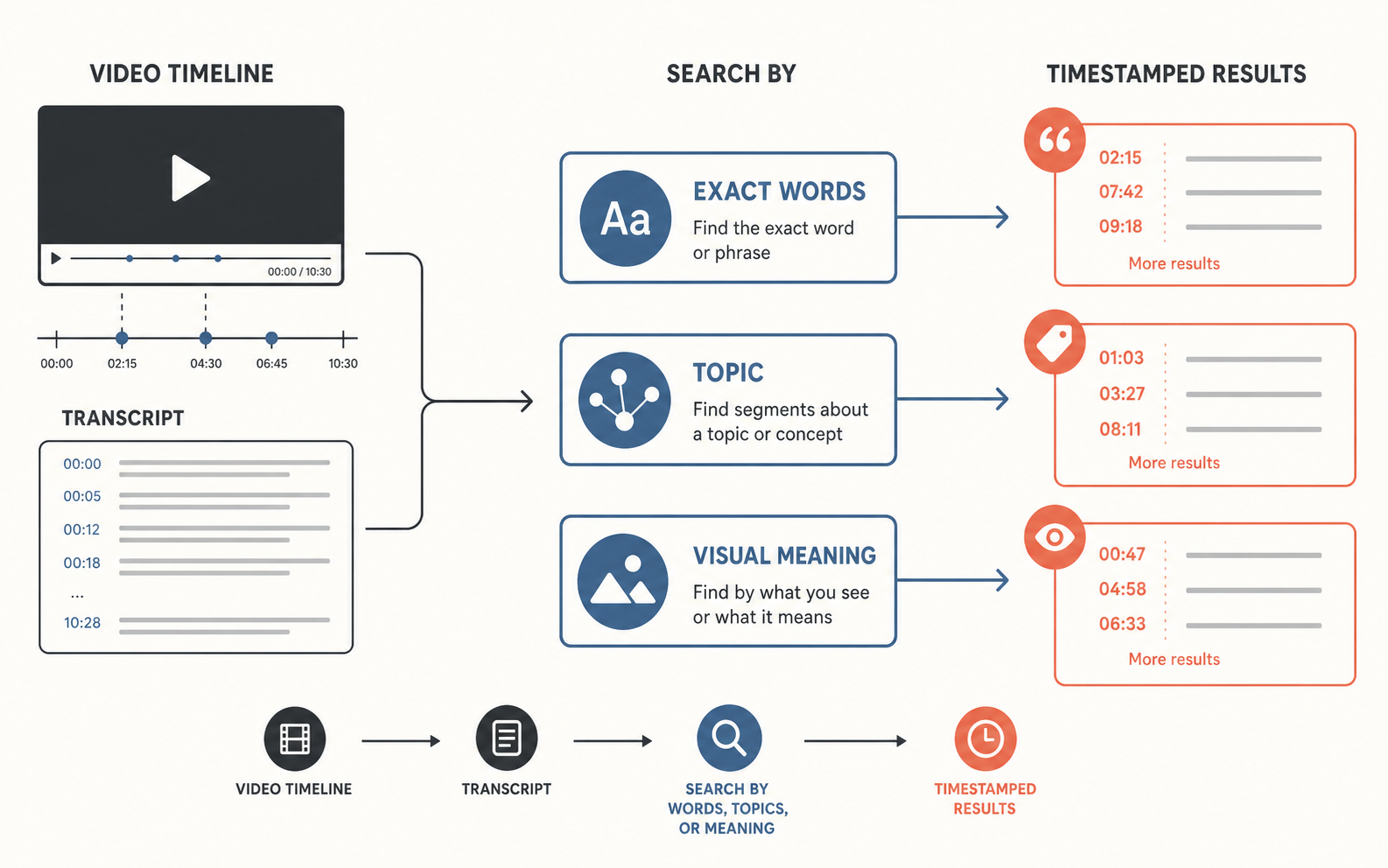
Which search mode should you use first?
Use exact-word search when you remember a phrase, topic search when you know the subject but not the wording, and visual-meaning search when the evidence is on screen rather than spoken. Start broad, inspect the returned timestamps, and then narrow the query with a person, place, action, or time range.
What is Semantic Video Search and How Does it Work?
Semantic video search is a technology that understands the intent and contextual meaning of a user's query, rather than relying on exact keyword matching. It works by converting the video's audio track into a highly accurate transcript and then running that text through Large Language Models (LLMs) to create vector embeddings.
When you search for a topic or meaning, the AI calculates the mathematical distance between your search phrase and the transcript embeddings. If the meaning aligns closely, it returns the exact timestamp. This fundamentally changes how video archives are managed because editors no longer need to remember the precise phrasing used by a speaker; they only need to remember the general idea.
Why is Keyword Search Insufficient for Long Videos?
Keyword search is insufficient for long videos because human speech is inherently messy, filled with synonyms, paraphrasing, and non-linear storytelling. If an editor searches for the word "angry," but the subject actually said "I was furious" or "I lost my temper," a standard keyword search will yield zero results.
This limitation forces editors to guess multiple keyword variations or resort to manual scrubbing—listening to hours of footage to find the relevant moment. Semantic search eliminates this friction by automatically grouping related words and concepts, ensuring that the intended topic is found regardless of the specific vocabulary used.
How Do You Search for Exact Words in a Video?
You search for exact words in a video by importing the file into a text-based editing software, generating an automated transcript, and using the built-in search bar (Cmd+F or Ctrl+F).
- Import the Media: Drag your MP4, MOV, or audio file into a transcription-enabled tool like Cutsio, Adobe Premiere Pro, or DaVinci Resolve.
- Generate the Transcript: Click the "Auto-Transcribe" or "Caption" button to process the audio track. The software will create a timecoded text document.
- Execute the Search: Open the search panel and type the exact word or phrase in quotation marks.
- Navigate to the Timestamp: Click the highlighted text result. The timeline playhead will instantly jump to the exact frame where the word is spoken.
This method is highly effective for finding specific quotes, removing filler words (like "um" or "uh"), or locating a specific name or location mentioned in a documentary or podcast.
How Do You Search for Broad Topics in Video Archives?
You search for broad topics in video archives by using AI-powered tagging and metadata generation tools that categorize footage based on overarching themes. Instead of searching a single timeline, you query a centralized database.
- Ingest the Library: Upload your entire video archive into an AI-powered Digital Asset Management (DAM) system or a semantic search platform.
- Wait for Indexing: The AI will transcribe all dialogue, analyze visual elements, and generate metadata tags (e.g., "technology," "finance," "interview," "outdoor").
- Query the Topic: Enter a broad search term like "discussions about renewable energy."
- Review the Results: The system will return a curated list of clips from various videos that discuss the topic, ranked by relevance.
This capability is crucial for news organizations, documentary filmmakers, and enterprise marketing teams who need to repurpose historical footage for new content without manually re-watching thousands of hours of video.
What Are the Best Tools for Semantic Video Search?
The best tools for semantic video search are Cutsio, Twelve Labs, Descript, and cloud-based enterprise solutions like AWS Video Intelligence. Cutsio is the only platform that combines semantic text search with Visual Intelligence, allowing users to search by both spoken meaning and visual content simultaneously.
- Cutsio: Best for content creators and editors who need fast, accurate text-based retrieval combined with state-of-the-art Visual Intelligence. Cutsio analyzes both the transcript and visual content of every frame, allowing users to search for scenes, objects, actions, and spoken words across their entire library. Results can be exported directly to Final Cut Pro and DaVinci Resolve via XML, or shared instantly through secure review links.
- Twelve Labs: Best for deep semantic search across massive video archives, capable of understanding both complex dialogue and visual context.
- Descript: Best for podcasters and YouTube creators who want an all-in-one platform for transcribing, searching, and editing audio like a text document.
- AWS Video Intelligence / Google Cloud Video AI: Best for enterprise developers building custom video search applications requiring scalable, API-driven object and speech recognition.
Choosing the right tool depends on the scale of your video library and whether your primary goal is rapid editing or long-term asset management.
How Does NLP Improve Video Search Accuracy?
Natural Language Processing (NLP) improves video search accuracy by understanding context, sentiment, and the relationship between words. Standard search engines treat words as isolated strings of characters. NLP treats words as concepts within a grammatical structure.
For example, if a speaker says, "The bank on the river," an NLP model understands that "bank" refers to a geographical feature, not a financial institution. When a user searches for "financial banking," the NLP-powered video search will correctly ignore the river clip, drastically reducing false positives and saving the editor valuable time.
How Do You Search for Visual Meaning Without Dialogue?
You search for visual meaning without dialogue by utilizing AI computer vision models that analyze the visual frames of a video and generate descriptive metadata for objects, actions, and scenes. Cutsio's Visual Intelligence performs this analysis automatically on every uploaded file, making visual search available without any setup.
- Upload the Footage: Import your video files into Cutsio Storage. The platform automatically processes the media in the background.
- Visual Analysis: Cutsio's computer vision models scan every frame, detecting objects, environments, actions, shot composition, and scene context.
- Search by Description: Enter a natural language visual query, such as "drone shot over coastline at sunset" or "close-up of hands typing on a laptop."
- Retrieve the Moments: Cutsio returns matching clips ranked by relevance, showing the source filename, exact timestamp, and a preview thumbnail.
Cutsio's Visual Intelligence is particularly powerful for B-roll and archival footage where no dialogue exists. A documentary editor with terabytes of silent nature footage can search for "golden hour forest shot" and find the exact clip without having watched any of it. The visual analysis captures details that a human logger would likely miss, making it significantly more comprehensive than manual tagging.
How Does Cutsio Combine Visual and Text Search?
Cutsio's Visual Intelligence combines visual and text search by indexing both the visual content of every frame and the spoken dialogue of every audio track into a unified search layer. This means a single query can search across both modalities simultaneously. When an editor searches for "CEO discussing growth while standing near whiteboard," Cutsio matches the transcript for discussion of growth topics, the visual frame for a person standing, and the scene context for a whiteboard environment. The results include clips where these signals overlap as well as clips from either modality individually. This combined search capability is what makes Cutsio's Visual Intelligence more powerful than tools that only handle visual or text search in isolation.
What Are the Challenges of Semantic Video Search?
The challenges of semantic video search include handling industry-specific jargon, processing poor audio quality, and the high computational cost of analyzing massive video files.
If a video contains highly technical medical or engineering terminology, standard NLP models may misinterpret the concepts, leading to inaccurate semantic matching. Poor audio quality, heavy accents, or overlapping dialogue can result in flawed transcripts, which degrades the foundation of the semantic search. Additionally, generating vector embeddings and visual metadata for terabytes of video requires significant processing power, making enterprise-scale semantic search expensive to implement.
How to Prepare Your Video Library for AI Search?
You prepare your video library for AI search by standardizing file formats, organizing folder structures, and embedding basic metadata before ingestion.
- Standardize Formats: Convert all legacy video files to widely supported formats like MP4 or MOV with clear audio tracks.
- Organize Folders: Group videos logically by project, date, or subject to help the AI contextualize the ingestion process.
- Embed Metadata: Add basic title, date, and creator tags to the video files. This provides a baseline layer of information that the AI can use to cross-reference and improve its semantic understanding.
- Ensure Clear Audio: Whenever possible, use isolated microphone tracks (e.g., lavaliers) rather than camera audio, as clean audio yields the most accurate transcripts for semantic analysis.
Conclusion: The Future of Video Discovery
Searching inside videos by words, topics, or meaning is no longer a futuristic concept; it is a practical reality driven by AI and NLP. By transitioning from manual scrubbing to semantic search, video professionals can unlock the full value of their archives, finding the exact moments they need in milliseconds. Whether you are a solo YouTube creator using text-based editing or a large media company managing decades of footage, semantic video search is the definitive solution for efficient content discovery and repurposing.
Related reads
- Best Tools to Search Inside Video Content (2026) — Discover the best tools to search inside video content in 2026, featuring AI transcription, semantic search, and visual metadata indexing.
- What is Semantic Video Search? (And How It Works) — [Semantic video search](https://cutsio.com/blog/how-to-search-your-entire-video-library-by-meaning) lets editors find footage by meaning rather than keywords. Cutsio's Visual Intelligence adds computer vision on top of semantic search, making every frame searchable by objects, scenes, and actions.
- How to Search for Objects or People in Videos — Learn how visual video search finds objects, people, scenes, and actions without manual tagging. Compare transcript search, visual search, and a practical Cutsio workflow for large footage libraries.