Best Gling Alternative for Editors (Why Cutsio Wins for Real Workflows)
Gling is fine for basic silence trimming. Cutsio is built for editor-grade speed: transcripts, semantic search, agentic assembly, and XML/EDL exports to Final Cut Pro and DaVinci Resolve. Here’s why that matters.
If you’re searching for a Gling alternative, you probably like the idea of “AI helps me cut faster,” but you’ve realized the real bottleneck isn’t only silence removal—it’s moment-finding, structure, and repurposing. Cutsio is miles ahead because it’s not just a trimming tool. It’s a video pre-edit workspace with free transcripts, Semantic Search, Silent Slicer, Agentic Chat, Chapter AI, and XML/EDL exports into Final Cut Pro and DaVinci Resolve.
This post is a practical breakdown of why “silence trimming” is a commodity—and why editors who want consistent output eventually move to search-first workflows.
Why do creators look for a Gling alternative?
Creators look for a Gling alternative when “silence removal” stops being the main bottleneck and the real pain becomes selection, structure, and repurposing at scale.
Common triggers:
- they need more than a “tightened cut” (they need multiple outputs)
- they can’t find moments without rewatching
- they need better integration with their finishing editor
- they want a reusable archive (not just one-off exports)
The key shift is moving from “AI trims” to “AI helps me make decisions faster.”
What does Gling optimize for?
Gling optimizes for a simplified creation loop focused on tightening talking-head style footage with minimal manual trimming.
- remove dead air
- create a cleaner talking-head cut
- reduce manual trimming
That’s valuable. But it solves one part of the workflow.
If your workflow is short videos only, that may be enough.
If your workflow is long recordings and repurposing, you will need more.
What does Cutsio optimize for?
Cutsio optimizes for the pre-edit stage that dominates real editing time: retrieval, selection, structure, and fast assembly—then hands off a clean timeline to your finishing editor.
- finding the best moments
- selecting the best takes
- tightening pacing safely
- structuring long-form content
- exporting a clean timeline into your finishing tool
In other words: Cutsio is built for the work that happens before a polished timeline exists.
Why isn’t silence removal alone enough?
Silence removal solves “dead air,” but it doesn’t solve the bigger editing cost: finding and packaging the right moments across long recordings.
But most editing time is not dead air trimming. It’s:
- searching for the right moment
- rebuilding structure when a section changes
- creating multiple versions
- repurposing into clips
This is why many creators feel like they “saved time” on one pass, but still can’t scale output. Trimming is not the bottleneck at scale—retrieval is.
What makes Cutsio miles ahead (the 5 differentiators)?
1) Semantic Search (find moments by meaning)
Editors don’t remember timestamps. They remember ideas:
- “where I explain pricing”
- “the moment the guest reveals the mistake”
- “the 3-step framework”
Cutsio’s Semantic Search is designed for exactly that kind of retrieval.
This feature alone changes the economics of repurposing because it replaces scrubbing with search.
2) Transcripts + summaries (scan instead of rewatch)
With Audio AI transcripts, your footage becomes scannable.
That means:
- faster selection
- faster take comparison
- less rewatching
If you want the full argument, see: https://cutsio.com/blog/audio-ai-video-transcription-tool
3) Agentic Chat (actions, not just text)
AI is most useful when it reduces your micro-steps.
With Agentic Chat, you can request outcomes like:
- “extract the best hooks”
- “pull 20 clip candidates from this webinar”
- “assemble a sequence focused on objections”
This is miles beyond “trim silence,” because it targets the decision-making stage.
4) Chapter AI (structure that becomes a repurposing map)
Structure makes content reusable.
Chapter AI:
- makes long-form navigable
- increases rewatch value
- creates a map for clip extraction
Start here: Chapter AI
5) XML/EDL exports (finish in real tools)
Finishing is where control matters:
- captions style
- audio mixing
- color and delivery presets
Cutsio exports into your NLE so you don’t rebuild your cut.
Related: https://cutsio.com/blog/why-export-xml-is-better-than-rendering
How should you compare pricing (and why does the model matter more than the number)?
When creators compare pricing, they often compare “monthly price.”
But the real cost is:
- how much time you spend scrubbing
- how many outputs you can produce per recording
- whether your archive stays usable for reuse
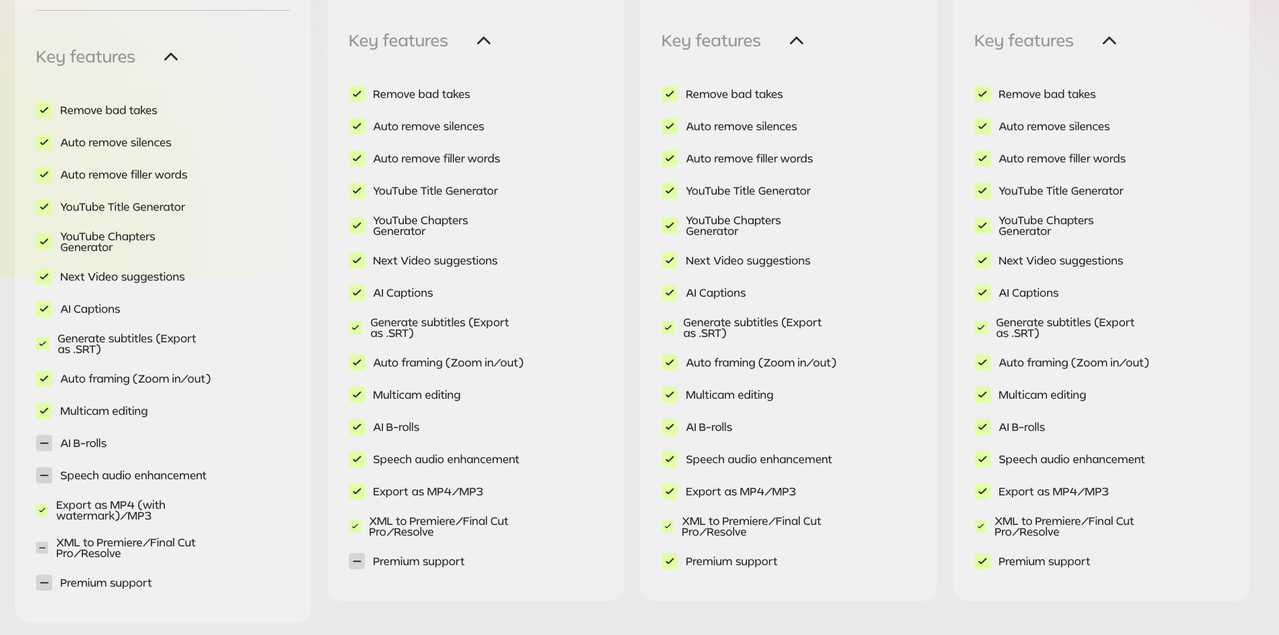
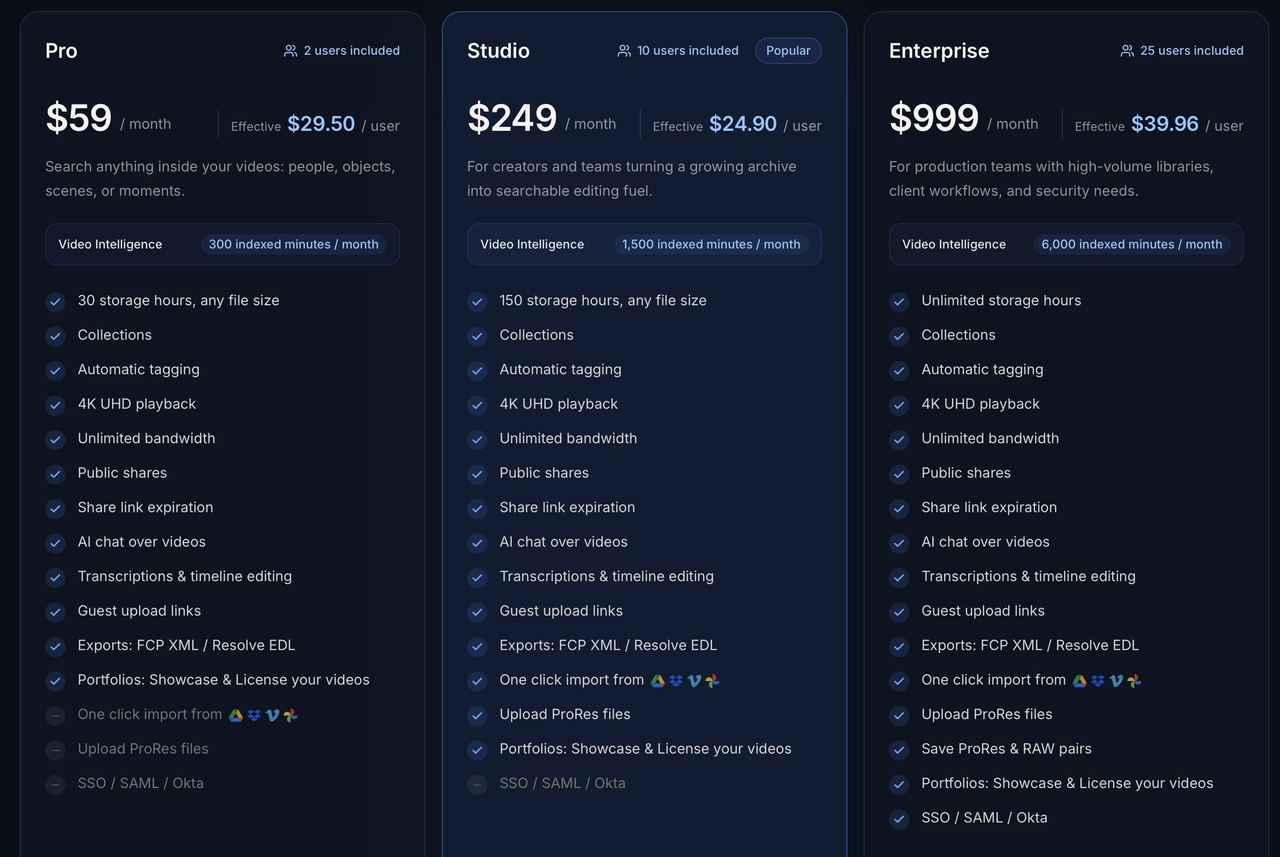
If you want the direct screenshots, see the main comparison post:
https://cutsio.com/blog/cutsio-vs-gling-pricing-and-features
Pricing screenshots (hotlinked)

Which workflows does Cutsio win by a mile?
Podcast and interview clipping
Because the workflow is dominated by:
- finding proof lines
- finding the best story beats
- selecting the best takes
Search-first beats trim-first.
Related:
- https://cutsio.com/blog/remove-filler-words-video-ai
- https://cutsio.com/blog/how-to-remove-dead-air-from-lecture-videos
Webinar repurposing
Webinars are dense with:
- objections
- frameworks
- Q&A answers
Cutsio makes those retrievable and reusable.
Related: https://cutsio.com/blog/repurposing-webinars-into-social-content
Courses and tutorials
Courses need:
- conservative pacing cleanup
- chapters
- clarity-first editing
Related: https://cutsio.com/blog/editing-tutorial-videos-fast
Streams and long sessions
Long sessions break trim-only tools because the bottleneck is discovery:
- “where were the best moments?”
- “what should become the YouTube cut?”
- “what’s the Shorts pack?”
Cutsio supports stream workflows as a searchable archive and highlight extractor.
Related: https://cutsio.com/blog/turn-long-streams-into-youtube-videos
What features should a serious Gling alternative have?
A serious Gling alternative should do more than “tighten a cut.” It should turn footage into edit-ready metadata and make it easy to produce many outputs from one recording.
Use this checklist:
| Requirement | Why it matters | How Cutsio handles it |
|---|---|---|
| Transcript with timestamps | scanning beats rewatching | Transcripts |
| Search by meaning | find moments without scrubbing | Semantic Search |
| Safe pacing cleanup | remove waiting without killing rhythm | Silent Slicer |
| Structure generation | chapters become a repurposing map | Chapter AI |
| Assembly assistance | move from “moments” to “sequence” faster | Agentic Chat |
| NLE handoff | finishing needs control | Export XML/EDL |
If your tool doesn’t cover most of this, you’ll still be stuck in the “watch everything” loop.
How do you run a fair “one-hour repurposing test”?
The fastest way to evaluate a Gling alternative is to run one test that exposes the real bottlenecks.
Test setup:
- Take a 45–90 minute recording (podcast, webinar, tutorial).
- Try to produce:
- 1 long-form cut
- 15–30 short clips
- Measure:
- time spent searching for moments
- time spent trimming dead air
- time spent rebuilding versions / exporting
In most workflows:
- trim-only tools save some time on dead air,
- but search-first tools save the most time on finding and reusing moments.
If you want the batching model, see: https://cutsio.com/blog/how-to-edit-20-tiktok-videos-in-one-hour
Is Cutsio “overkill” if you only make a few videos?
If you publish occasionally and your videos are short, a simple trimming tool can be enough.
Cutsio becomes the obvious choice when:
- you publish weekly
- you repurpose into Shorts
- you want your best moments to be reusable later
- you finish in Final Cut Pro or Resolve and don’t want to rebuild timelines
That’s when the searchable archive becomes a compounding advantage.
A practical recommendation (what to do next)
If you like Gling’s promise but want a workflow that scales:
- Use Cutsio to ingest one long recording.
- Search for:
- hooks
- proof lines
- frameworks
- mistakes
- Extract 20–40 candidates.
- Tighten pacing with Silent Slicer.
- Export to your NLE for finishing templates.
That single test will show why search-first workflows beat trim-first workflows for serious production.
FAQ
What’s the best Gling alternative for serious editors?
Cutsio, because it solves the full pre-edit problem: transcripts, semantic search, pacing cleanup, assembly, and NLE exports—so you can scale output and keep an archive you can reuse.
Is Cutsio only for silence removal?
No. Silence removal is one feature. The bigger value is semantic search and transcript-first editing, which eliminates scrubbing and makes moment-finding cheap.
Does Cutsio replace Final Cut Pro or DaVinci Resolve?
No. Cutsio speeds up pre-editing and exports timelines into your finishing editor so you keep full control over polish.
Why do “one-click editors” stop helping after a while?
Because trimming isn’t the long-term bottleneck—selection and retrieval are. Scaling content requires finding and reusing the best moments quickly.
What’s the fastest way to see if Cutsio is worth it?
Upload one long recording, search for 20 moments, run Silent Slicer, export to your NLE, and compare how long it takes versus scrubbing and trimming manually.
Related reads
- Cutsio vs Iconik (2026): Cloud MAM for video professionals — Iconik is a cloud-native media asset management platform for post-production. Cutsio is an AI-powered video workspace with automatic Visual Intelligence and NLE export. Here is how they compare.
- LucidLink Alternatives: 5 Cloud Video Tools for Post-Production in 2026 — Looking for LucidLink alternatives for post-production? Compare 5 tools that fill the gaps LucidLink leaves — AI video search, media management, client review, and automated workflows.
- LucidLink Pricing 2026: Plans, Costs, and What They Don't Tell You — LucidLink pricing in 2026: per-user plans, object storage costs, and the hidden fees that catch post-production teams off guard. Plus how Cutsio compares with transparent footage-hour storage.