The Future of AI in Video Editing
The future of AI in video editing is a workflow where editors spend time on narrative decisions because AI handles the slowest parts: scrubbing, logging, finding takes, removing dead air, and reframing footage for social. Cutsio's Visual Intelligence and AI Reframe are the most advanced tools in this space.
The future of AI in video editing is a workflow where editors spend most of their time making narrative decisions instead of scrubbing, logging, and trimming dead air. Cutsio is built for this future: its Visual Intelligence makes every frame of footage searchable by visual content, its Silent Slicer removes pauses automatically, and its AI Reframe converts landscape footage to vertical format on its servers — all before you export an XML or EDL timeline to Final Cut Pro or DaVinci Resolve for finishing.
What is AI video editing actually becoming?
AI video editing is becoming AI-assisted pre-editing rather than a one-click final export tool. The distinction between pre-editing and finishing is the key structural change in modern video workflows.
Pre-editing covers indexing, searching, selecting, tightening, and assembling a rough cut. Finishing covers sound design, color grading, motion graphics, pacing nuance, and brand polish. Most creators do not need AI to decide their story. They need AI to remove the time spent getting to the story. Cutsio is positioned squarely in pre-editing with Visual Intelligence for frame-level visual search, transcripts and AI summaries, semantic search across your entire library, the Silent Slicer for dead air removal, footage-hour storage that does not punish 4K footage, and XML or EDL export to professional NLEs.
Why does the scrubbing era need to end?
The scrubbing era needs to end because content volume grows faster than human review time. An editor publishing two YouTube videos per week, five to twenty Shorts per week, one podcast per week, plus customer stories, course modules, ads, and internal demos cannot afford to watch everything just to find the best ninety seconds.
The future is simple: footage becomes a database. Editors query it, assemble sequences, and only then move into high-touch finishing. Cutsio's Visual Intelligence makes this possible by analyzing the visual content of every frame alongside audio, creating a unified search index where any moment is findable by what the camera saw.
How does Cutsio's Visual Intelligence change the editing workflow?
Cutsio's Visual Intelligence changes the editing workflow by replacing manual timeline scrubbing with AI-powered search that finds shots based on visual content, speech, and scene context simultaneously.
When an editor uploads raw footage to Cutsio, Visual Intelligence processes every frame across three intelligence layers. The visual layer analyzes objects, scenes, actions, and composition using computer vision models trained on diverse production footage. The speech layer transcribes dialogue with high accuracy and attaches every word to its exact timestamp. The semantic layer understands the relationship between visual and audio signals, enabling complex queries that span both modalities. An editor can search for "CEO laughing while discussing quarterly results" and Cutsio matches both the visual expression and the spoken topic simultaneously.
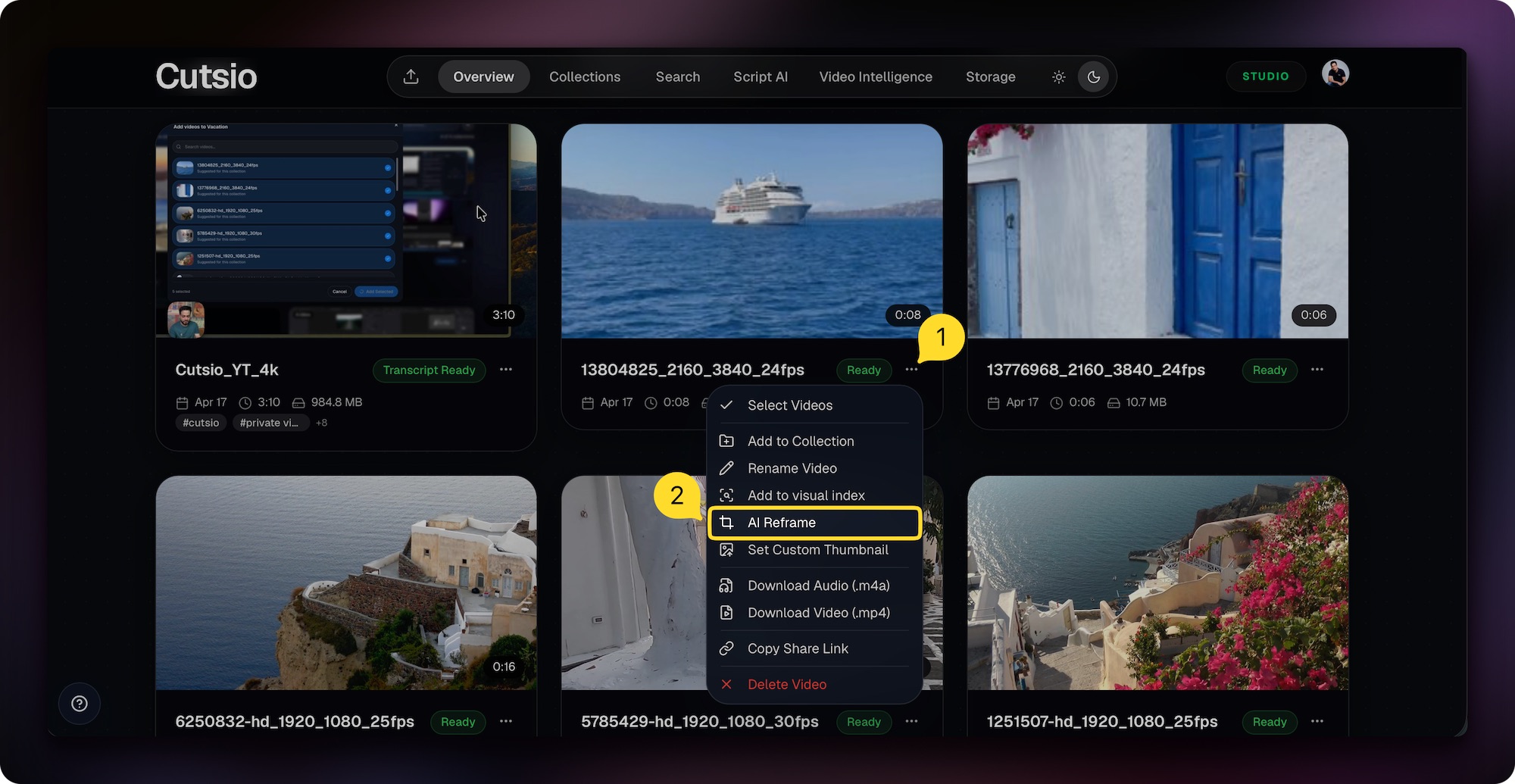
playback-id="IRBqKFllfQTZRgUpvF00DnjqMROLtyclqpWYRLQez6KQ" title="Cutsio Visual Intelligence — search video by what the camera saw" poster="https://image.mux.com/IRBqKFllfQTZRgUpvF00DnjqMROLtyclqpWYRLQez6KQ/thumbnail.jpg"> The results are visible immediately. An editor searching for "wide shot of interview subject entering a room" gets exact timestamps with thumbnail previews, match confidence scores, and surrounding transcript context. No manual logging, no keyword tagging, no upfront organization work. The footage becomes searchable the moment it enters the system. AI solves the problems with the highest wasted human time in post-production. The table below shows the specific pain points AI eliminates first. Notice what is missing from this list: AI deciding the story. Storytelling remains the rare, high-value part that benefits from human judgment. AI Reframe solves the vertical format problem by converting 16:9 landscape footage to 9:16 vertical on Cutsio's servers, so editors get social-ready clips back in their library without rendering on their own machines. The most time-consuming part of repurposing long-form content for Shorts, Reels, and TikTok is not finding the moments — it is reframing them. Traditional workflows require exporting a clip from your NLE, opening it in a separate tool, adjusting crop regions, adding captions, and rendering the vertical version locally. Cutsio's AI Reframe eliminates this entirely. Take any landscape video in your library, press "AI Reframe," and the vertical version renders on Cutsio's infrastructure. The reframed clip appears in your library ready for export. The AI Reframe button lives directly in the video player so creators never leave their library to produce a vertical version. For a complete walkthrough, see the AI Reframe feature page. The human editor remains essential for taste, narrative, audience empathy, brand, and finishing craft. AI can suggest structure. It cannot be accountable for meaning. Taste determines what to emphasize and what to omit. Narrative covers stakes, escalation, and payoff. Audience empathy requires understanding what will confuse or bore viewers. Brand encompasses tone, pacing style, and visual language. Finishing craft includes sound design, color, motion, and intentional rhythm. AI tools like Visual Intelligence and AI Reframe handle the mechanical layer beneath these creative decisions, but they do not replace them. The editor who understands this distinction keeps creative control while shipping faster.
Visual Intelligence finds every shot by what the camera saw. Silent Slicer removes dead air. AI Reframe converts to vertical on our servers. Then export XML to your NLE.
Choose a plan based on your storage and visual-indexing needs. AI creates different futures for different content types. YouTubers benefit from faster hook testing, rapid compilation of best moments from long sessions, and systematic repurposing into Shorts through AI Reframe. Educators benefit from removing dead air without losing clarity, searching their library for the exact explanation of a specific concept, and building consistent modules from transcript-driven outlines. Podcasters benefit from removing silence and tightening conversations, finding quotable moments by meaning, and creating clips for distribution without re-listening to the full episode. Cutsio was designed around these exact use cases: ingest, search, tighten, reframe, assemble, export. A future-proof workflow is modular: AI handles pre-editing, then your NLE handles finishing. This is the model that scales across project types and team sizes. This is the opposite of an AI system that spits out a final MP4. It preserves creative control at every stage while eliminating the mechanical labor that slows editors down. When you can read the content, you stop treating editing like moving clips and start treating it like making decisions. This shift creates compounding advantages. Search beats memory because you do not need to remember where a moment happened. Text beats time because you scan faster than playback speed. Structure becomes obvious because you see repetition, tangents, and missing beats at a glance. Cutsio's transcripts and summaries are designed to make this the default starting point for every project. Keyword search only finds exact phrases. Semantic search finds meaning. An editor looking for "the part where I explained why this matters" or "where the guest disagrees" or "the funniest moment in the first half" gets results based on conceptual understanding, not character matching. Cutsio's Visual Intelligence extends this further by adding visual semantic search — finding moments by what the camera saw, not just by what was said. This is the difference between "I remember they said pricing" and "I need the segment that explains the pricing objection with the speaker gesturing emphatically." Agentic editing means editors can ask for outcomes instead of operations. Instead of finding a clip at a specific timestamp, cutting it, ripple deleting, and adding markers, the editor asks the AI to pull the best hooks, build a cut focused on a specific angle, or extract highlight clips. Cutsio's Agentic Chat is designed for this request-to-sequence loop, where the editor then refines like a normal editor. The role shifts from mechanical operator to creative director. As camera quality increases, storage costs become the hidden tax on creativity. If pricing scales with gigabytes, creators are incentivized to compress footage, delete takes, and avoid recording long sessions. Cutsio flips this with footage-hour storage: upload high-quality footage without being punished for resolution. This matters because the future workflow depends on keeping raw footage available and searchable through Visual Intelligence across all projects. Do not measure AI usage. Measure outcomes. Time-to-first-cut should drop to minutes instead of hours. Time spent scrubbing should approach zero. Versions per recording should increase to three or more. Reuse of proven moments should become consistent. Editor satisfaction should rise as burnout drops when drudgework disappears. If your workflow still involves watching everything, AI is not being used where it matters most. AI changes collaboration by creating a shared, searchable source of truth that non-editors can actually use. In a legacy workflow, only the editor can see the project because it lives inside an NLE file. Producers and marketers send vague messages like "the part where you said the thing about pricing," and the editor becomes the translator. In a Visual Intelligence-first workflow, a producer searches the library for "pricing objection" and pastes the exact moment. A marketer requests "three hooks that mention time saved" and gets a candidate list. An editor focuses on shaping the cut instead of doing detective work. Do not automate anything that depends on taste, context, or audience nuance. Comedic timing with micro-pauses and reaction beats requires human judgment. Brand voice and what feels on-brand versus generic requires human taste. The emotional arc of an episode and the decision to cut a moment that is true but distracting requires human context. Use AI to remove the drudgework. Use humans to decide what the work means. If you are unsure whether something should be automated, ask a simple question: would you trust a junior editor to do this without context? If the answer is no, it is probably a taste task, not an automation task. AI will replace the parts of editing that are mostly time cost — scrubbing, logging, and rough assembly. Editors who adapt will ship more and focus on creative decisions. Editors who refuse will compete against workflows that are simply faster. An NLE is a finishing tool designed for precision. An AI pre-editor like Cutsio is designed for speed: transcripts, visual search, selection, reframing, and rough assembly. The future workflow uses both — AI to get to a solid cut quickly, then the NLE to polish. Cutsio's AI Reframe processes the 16:9 to 9:16 conversion on Cutsio's servers. You select any landscape video in your library, press AI Reframe, and the vertical version appears in your library without rendering on your local machine. Trying to force AI to output a final video. The highest-leverage use is pre-editing: organize, search, tighten, reframe, assemble, then hand off to the finishing tool. Cutsio sits before your NLE. You ingest raw footage, search and assemble using Visual Intelligence, tighten pacing with Silent Slicer, reframe for social with AI Reframe, then export XML or EDL into Final Cut Pro or DaVinci Resolve for finishing.
Cutsio combines Visual Intelligence, AI Reframe, Silent Slicer, and XML export so you skip the mechanical phase of editing entirely. Search footage by visual content, reframe to vertical on our servers, and export structured timelines to your NLE.
Choose a plan based on your storage and visual-indexing needs.What problems will AI solve first in video editing?
Editing pain point Why it is expensive What AI does Logging and note taking Requires real-time watching Transcript and summary generated instantly Finding moments Scrubbing across hours of footage Semantic search by meaning and visual content Choosing takes Comparing variants manually Best-take selection from dialogue and visual cues Tightening pacing Cutting silences one by one Dead air detection with Silent Slicer Creating social versions Rebuilding edits for vertical format Server-side AI Reframe from 16:9 to 9:16 How does AI Reframe solve the vertical format problem?

What stays human in the future of editing?
The pre-editing stack for the future of video.
What changes for creators, educators, and podcasters specifically?
What does a future-proof AI editing workflow look like?
Why transcripts become the new timeline
Why semantic search beats keywords for video footage
How does agentic editing change the editor's role?
Why storage pricing becomes an editing problem
How to measure whether AI is improving your editing workflow
How does AI change collaboration inside a team?
What should you not automate in editing?
FAQ
Will AI replace video editors?
What is the difference between an AI editor and an NLE like Final Cut Pro?
How does Cutsio's AI Reframe work compared to manual reframing?
What is the biggest mistake teams make when adopting AI editing?
How does Cutsio fit into an existing professional workflow?
The AI editing stack that works the way editors think.
Related reads